
Take a photo on your phone right now and send it to someone. Before you do, consider using Remove Metadata from Photo to strip away hidden information that may be embedded in the image.
Along with the image itself, you may otherwise be handing over a small file’s worth of information you probably never agreed to share – the exact model of camera or phone that took it, the date and time down to the second, sometimes the GPS coordinates of where you were standing, and even details about any software that touched the file afterward.
Most people never think about it. But if you’re a freelancer sending a portfolio, a business owner uploading product photos, a student submitting an assignment, or just someone who wants to post pictures online without broadcasting their home address, that hidden data matters. It’s the digital equivalent of leaving a sticky note on the back of every photo with your personal details written on it.
Our free online tool lets you remove metadata from photo files instantly, right in your browser. There’s nothing to install, no account to create, and we don’t keep copies of anything you upload – your file is cleaned and handed back to you, and that’s the end of it.
Using it is about as simple as things get: drag your file into the box, click the “Remove Metadata” button, and download the cleaned version a few seconds later. No technical knowledge required, and it works the same way whether you’re on a laptop or your phone.
Remove Metadata from Image
Photos from your camera aren’t the only images carrying hidden data. Screenshots, scanned pages, memes you’ve saved, graphics you’ve downloaded – all of these can hold onto EXIF, IPTC, or XMP data that reveals more than you’d expect. Sometimes it’s harmless. Other times it’s the software you used to edit the image, the device it was captured on, or even GPS coordinates buried several layers deep in the file.
You can use this tool to remove metadata from image files in the most common formats – JPG, PNG, WEBP, and TIFF – and it’s worth doing in a few specific situations:
- Before uploading product or profile images to a website, store, or marketplace
- Before sending photos to a client, a stranger online, or anyone outside your close circle
- Before sharing screenshots that might contain hidden device or location data
Upload the image, and the tool strips out EXIF, IPTC, and XMP data in one pass. Nothing about the way the image looks changes – same resolution, same colors, same quality. Only the invisible part is gone. Learn more about what EXIF data actually stores in a photo file if you’re curious how deep this goes.
Remove Metadata from PDF
PDFs have their own version of this problem, and it’s easy to forget about because the file “looks” clean when you open it. Behind the scenes, though, a PDF can carry the author’s name, the company it was created under, the exact date it was made or last edited, and details about the software used to produce it. If you’ve ever opened a document’s “Properties” panel and been surprised by what’s listed there, you already know the issue.
This tool can remove metadata from PDF documents – wiping author information, timestamps, and editing history – without touching the actual content or formatting of the file. That makes it especially useful before sending out contracts, resumes, proposals, or reports, particularly now that data privacy regulations like GDPR put real pressure on businesses to limit how much personal information they expose, even accidentally.
Remove Metadata from Video
Video files get overlooked constantly, but they carry just as much hidden information as photos do – sometimes more. Recording device, GPS coordinates, timestamps, software tags, and other technical details can all be embedded in a video file without any visible sign of it.
Use this tool to remove metadata from video files in formats like MP4, MOV, and AVI before you post them online or send them to someone else. It’s a fast way to strip that information out without needing to install a full video editor just to fix one setting.
How to Remove Metadata from Word Documents
Word documents are sneaky about this. Even after you think you’ve cleaned a file up, it can still be holding onto the author’s name, your company details, a full edit history, and comments you thought you deleted. This trips people up constantly when sharing resumes, proposals, or anything official – you’d be surprised how often a document reveals who “really” wrote it, or who else had their hands on it.
Here’s how to remove metadata from Word files using this tool:
- Upload your .docx file
- Click “Remove Metadata”
- Download the cleaned file, ready to share safely
That’s it – no digging through Word’s “Document Inspector” menu, no guessing which checkbox actually removes what. If you handle client files regularly, take a look at our privacy policy to see exactly how we handle anything you upload, or browse our blog for more tips on keeping your files private.
Remove Metadata from AI-Generated Images and Videos (Gemini, ChatGPT, Midjourney, and More)
This is quickly becoming one of the most searched problems out there, and for good reason. AI image and video generators – Google Gemini, ChatGPT’s image tool (built on DALL·E), Midjourney, Adobe Firefly, Sora, and others – don’t just create content out of thin air.
Many of them tag the files they produce with metadata that identifies the content as AI-generated. That can include the name of the generator, the model version, sometimes the prompt itself, and technical watermarking data (like Google’s SynthID) that’s invisible to the eye but detectable by software.
Why does this matter? A few real reasons come up constantly:
- Platform rules. Some marketplaces, stock photo sites, and social platforms restrict or flag AI-generated content, and that flag often comes directly from embedded metadata rather than any visual analysis.
- Privacy around prompts. If your prompt contained anything personal or sensitive, you probably don’t want that text sitting inside the file’s metadata for anyone to dig up.
- Simple cleanliness. Just like a camera photo, an AI-generated image or video can carry generator names, creation timestamps, and software tags that have nothing to do with the actual content and that you may not want attached when you publish or forward the file.
This tool handles that too. Upload an image or video generated by Gemini, ChatGPT, Midjourney, DALL·E, Sora, or basically any other AI tool, and it will strip the embedded generator tags, model information, and other technical metadata – while leaving the image or video itself completely untouched.
One quick note on watermarking: some platforms embed an invisible, cryptographic watermark (like SynthID) directly into the pixel or audio data rather than the metadata field. Standard metadata removal won’t affect that layer, since it’s part of the content itself rather than a metadata tag – but it will clear out everything stored in the traditional metadata fields, which covers the vast majority of what’s actually exposing the file as AI-made or tied to a specific prompt.
If you’re a content creator, marketer, or anyone publishing AI-generated visuals regularly, this is worth making a habit – run every AI image or clip through the tool the same way you’d run a phone photo through it, before it goes anywhere public.
FAQ
How do I remove metadata from a picture?
Upload your picture using the tool above, click “Remove Metadata,” and download the cleaned version. It takes just a few seconds and works entirely in your browser.
Does removing metadata affect image or file quality?
No. Removing metadata only strips hidden data, like EXIF fields or document properties – it doesn’t touch the visual quality, resolution, or content of your file in any way.
Is it safe to use this tool for sensitive documents?
Yes. Files are processed and are not stored on our servers, so your data stays private the whole way through.
Can I remove metadata from multiple file types at once?
Yes. The tool supports images, PDFs, videos, and Word documents, so you don’t need a separate tool for each file type.
Does this tool remove GPS location data from photos?
Yes. GPS coordinates live inside EXIF metadata, and they’re removed along with everything else during the process.
Can this remove metadata from images made by ChatGPT, Gemini, or Midjourney?
Yes. AI-generated images and videos often carry generator names, model details, and other technical tags in their metadata, and this tool clears that out the same way it does for a regular photo or PDF.
Will this remove an invisible AI watermark like SynthID?
Not entirely. Some AI platforms embed a cryptographic watermark directly into the image or audio content itself rather than in the metadata fields, and that kind of watermark isn’t affected by standard metadata removal. What this tool does remove is everything stored in the traditional metadata layer – generator names, model versions, timestamps, and similar tags.
All Keywords: metadata remover, pics io metadata remover, remove metadata, remove metadata from photo, remove metadata from pdf, remove metadata from image, how do i remove metadata from a picture, pdf metadata remover, how to remove metadata from photos, remove metadata from picture, remove image metadata, how to remove metadata from pdf, remove metadata from video, how to remove metadata from images, how to remove metadata from word, remove ai pixel metadata remover undetectable ai image, ai metadata remover, how to remove ai metadata from photos, remove ai metadata, remove ai metadata from image, remove ai metadata from photo, remove ai metadata from text, ai image metadata remover, how to remove ai metadata from text, remove ai image metadata
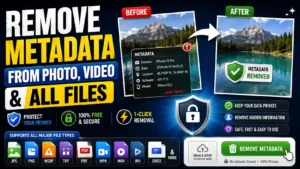
Remove hidden metadata from your photos and videos before sharing them online. This free metadata remover tools helps you check file information and remove unwanted metadata directly in your browser.
Choose a file to get started.
Upload your image or video, let the tool scan the file, then remove the metadata and download the processed file.
What Does This Metadata Remover Do?
Photos and videos can contain information that you may not notice when viewing the file normally. Depending on the file and device, this information can include camera details, capture dates, GPS coordinates, software information, and other technical properties.
This metadata remover is designed to help you clean that information before you share a file.
Instead of manually checking file properties or installing desktop software, you can use the tool directly from your browser. Upload your file, review the available information, remove unwanted metadata, and save the cleaned version.
The original file stays separate from the processed copy, so you can keep your original file if you need it later.
Remove EXIF and Other Hidden Metadata
One of the most common types of photo metadata is EXIF data. Digital cameras and smartphones can store technical information inside an image file.
Depending on the image, EXIF information may include:
- Camera or device model
- Date and time
- GPS or location information
- Camera settings
- Image orientation
- Software or editing information
- Other embedded file properties
Removing metadata can be useful when you want a cleaner file before uploading it to a website, sending it to another person, or publishing it publicly.
Not every file contains the same metadata. The information available depends on the device, application, file format, and how the file was created or edited.
How to Use the Metadata Remover
Using the tool is straightforward.
1. Select Your File
Choose an image or video from your device, or use the upload area to add your file.
2. Let the Tool Scan the File
The tool checks the selected file and identifies metadata or file information that can be processed.
3. Remove Unwanted Metadata
Start the metadata removal process. The tool creates a cleaned version of the file without the metadata that it is able to remove.
4. Download the Clean File
When processing is complete, download the resulting file and use it wherever you need it.
For the best result, always check the downloaded file if the metadata is particularly important to your privacy requirements.
Why Remove Metadata Before Sharing Photos?
A photo can reveal more information than what appears in the picture itself.
For example, a smartphone photograph may contain location information generated by the device. If that information remains embedded in the original file, another application or service may be able to read it.
Removing metadata can therefore be a useful step when preparing images for:
- Social media
- Public websites
- Online marketplaces
- Forums and communities
- Blogs and portfolios
- Freelance projects
- Client deliveries
- Public documents
- Private messages and file sharing
The visible image does not necessarily show this information, which is why checking the file itself can be worthwhile.
Supported File Types
The tool is designed to work with commonly used image and video formats.
Image Formats
- JPG
- JPEG
- PNG
- WebP
- GIF
- BMP
- HEIC
- AVIF
Video Formats
- MP4
- MOV
- M4V
- WebM
- MKV
Metadata availability and removal capabilities can vary between formats. A file may also contain information that cannot be removed through browser-based processing.
Is This Metadata Remover Private?
The tool is designed for browser-based processing. When a file is processed locally in the browser, the file does not need to be uploaded to a remote server for the processing itself.
This can be useful when working with personal photos or other files that you do not want to send to an online service.
However, browser support and file-processing capabilities can vary depending on the file type and device. If privacy is critical, verify the behavior of the tool with a non-sensitive test file before processing important material.
Metadata Remover for AI-Generated Images
AI-generated images can also contain technical or descriptive information depending on the generator, application, export method, and file format used.
If you download an AI-generated image and plan to publish or share it elsewhere, checking its metadata can help you understand what information is included in the file.
A metadata remover can be useful when preparing AI-generated images for:
- Websites
- Social media
- Digital portfolios
- Blog posts
- Online communities
- Design projects
- Client deliveries
Metadata removal does not change the visual appearance of an image simply because metadata is removed. The result depends on how the particular file is processed and exported.
When Should You Remove Metadata?
There is no requirement to remove metadata from every file.
For personal archiving, metadata can actually be useful. Dates, camera information, and location data can help organize a personal photo collection.
Removing metadata makes more sense when you are preparing a file for public or wider distribution and do not need the embedded information.
A simple workflow is:
Keep the original → check the metadata → create a cleaned copy → share the cleaned copy.
This lets you preserve the original file while using a cleaner version for publishing or sharing.
Does Removing Metadata Reduce Image Quality?
Metadata is separate from the visible pixels of an image. Removing metadata does not inherently mean that an image must become lower quality.
However, the final result can depend on the processing method and file format. If a tool has to re-encode an image rather than simply remove embedded information, there may be differences in file size or image characteristics.
For important images, compare the original and processed versions before replacing your original file.
Can I Check Metadata Before Removing It?
Yes. Checking metadata first is a good idea when you want to understand what information is stored in a file.
You may find details such as:
- File type
- Dimensions
- Camera information
- Date information
- Location information
- Software information
- Other technical properties
The amount of information available varies from file to file.
Frequently Asked Questions
What is a metadata remover?
A metadata remover is a tool that removes embedded information from digital files. For images, this commonly includes EXIF data and other technical information stored inside the file.
What is EXIF data?
EXIF stands for Exchangeable Image File Format. It is a type of metadata commonly associated with digital photographs and may contain information such as camera settings, dates, device details, and sometimes GPS coordinates.
Does this metadata remover change my photo?
Metadata removal targets information stored with the file rather than the visible content of the photograph. The exact result depends on the file format and the processing method used by the tool.
Can I remove GPS information from a photo?
If GPS information is present in removable metadata, removing that metadata can remove the embedded location information from the processed file.
Can I use this tool on AI-generated images?
Yes, you can use the tool to process supported image files created by AI image generators or other software. The metadata contained in an AI-generated image depends on how the image was created and exported.
Does every photo contain metadata?
No. Metadata varies between files. Some images contain extensive EXIF information, while others may contain little or none.
Should I keep my original file?
Yes. It is a good practice to keep the original file and use the processed copy for sharing. This gives you a backup if you later need the original metadata.
A Simple Way to Prepare Files for Sharing
Before publishing a personal photo or video, take a moment to consider what information the file might contain.
If you do not need the embedded information, use the metadata remover to create a cleaned copy. You can then share that version while keeping your original file safely stored.
The goal is simple: share the content you intend to share, without unnecessary file information attached to it.
Use the tool above to process your file and create a cleaner version before sharing.