
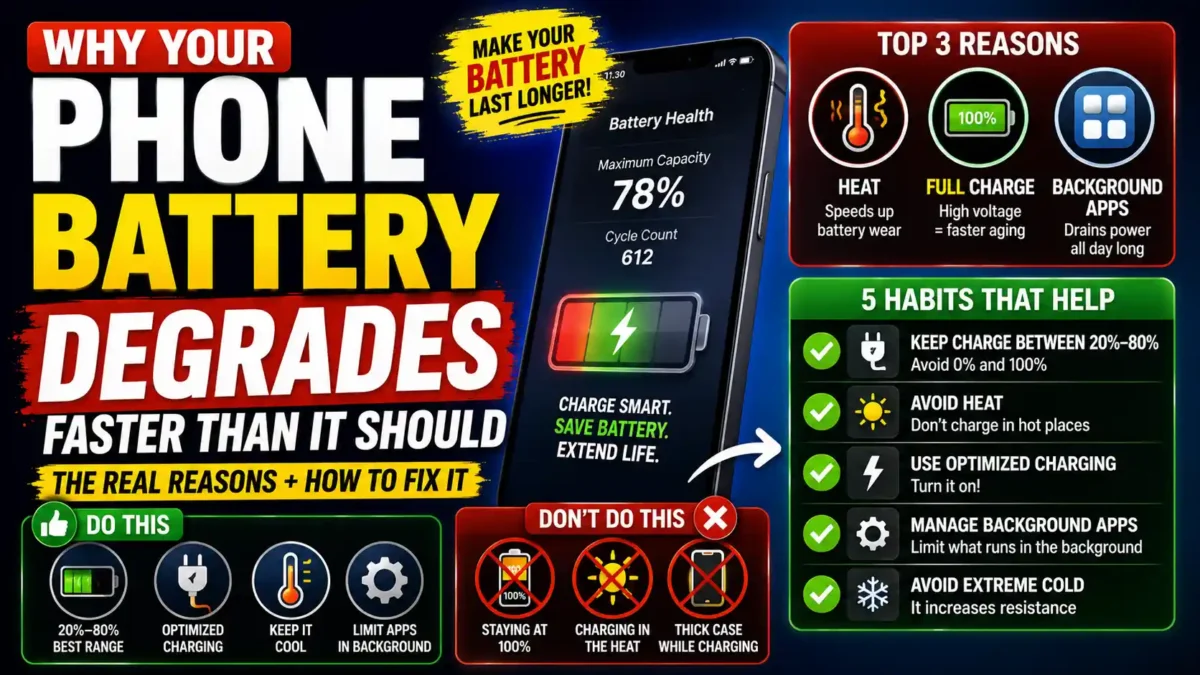

Heat, high charge levels, and background apps wear phone batteries down early. Here’s why it happens and the habits that actually slow it.
Your phone is two years old, the battery used to last all day, and now it’s dead by 4pm even though you barely touched it. Why your phone battery degrades faster than it should usually comes down to three things working against you at once: heat, time spent sitting at a full charge, and a background workload that’s heavier than it looks. None of that is planned obsolescence. It’s chemistry, and chemistry responds to habits.
The good news is that slowing this down doesn’t require replacing your phone or babying it obsessively. A handful of specific, low-effort changes make a measurable difference over the life of the battery. This guide covers why degradation happens faster than it should, then walks through the habits that actually slow it, step by step.
Why phone batteries degrade faster than they should
Every phone battery loses capacity over time. That part is unavoidable lithium-ion chemistry. What’s not unavoidable is losing capacity twice as fast as the chemistry actually requires, which is what happens to most phones because of a small set of everyday habits.
Voltage is the biggest hidden factor. Most phone batteries use NMC (Nickel Manganese Cobalt) chemistry, which has a maximum voltage around 4.2 volts at 100% charge. Research published in the Journal of the Electrochemical Society found that cycling a battery between 0% and 100% brought it down to 80% capacity after around 500 charge cycles, while cycling the same battery only up to roughly 75% extended that to over 2,000 cycles. The top slice of the charge range, from about 80% up to 100%, causes disproportionate wear compared to everything below it.
Heat is the second major factor, and it’s arguably worse than most people assume. Elevated temperatures speed up the chemical reactions inside the battery that cause permanent capacity loss, and charging while the phone is already hot compounds the damage since both heat sources stress the chemistry at the same time. Leaving a phone in direct sunlight, on a car dashboard, or under a thick case while fast charging all fall into this category.
The third factor is less obvious: modern phones simply do more work than older ones, even sitting untouched in your pocket. Background indexing, photo scanning, location checks, and constant Bluetooth handshakes with wearables and earbuds all draw power around the clock, which means the battery cycles more often per day than it did on a phone from five or six years ago, even with identical usage habits.
Battery chemistry itself also plays a bigger role than most people realize. Not every phone uses the same type of lithium-ion cell. NMC, the chemistry in most iPhones, Samsung Galaxy phones, and Google Pixels, degrades fastest at high voltage, which is exactly why the habits below focus so heavily on avoiding a full charge. LFP, used in some newer iPhone models and a handful of other flagships, tolerates sitting at 100% noticeably better, though it still suffers at high temperatures the same as NMC does. Newer silicon-carbon batteries, now appearing in some 2026 flagship phones, pack more capacity into the same physical space but come with their own longevity trade-offs that are still being studied. Knowing which chemistry your phone uses isn’t required to follow the habits below, but it explains why some phones seem to tolerate full charges better than others even with similar usage patterns.
Cold weather adds a separate wrinkle to all of this. As a battery ages and its internal resistance rises, cold temperatures make that resistance spike further, which is why an older phone might suddenly shut off at 20% during a winter walk even though the battery still shows a decent percentage. This isn’t the same kind of permanent degradation caused by heat and high voltage, but it compounds with age to make an aging battery feel far less reliable than its health percentage alone would suggest.
Manufacturing quality plays a smaller, less controllable role too. Occasionally a battery degrades faster than it should simply because of a materials or assembly flaw rather than anything the owner did. If a battery is losing capacity unusually fast within the first year compared to how the phone is actually used, that’s worth raising with the manufacturer rather than assuming it’s a habits problem.
What actually slows phone battery degradation
These steps target the three factors above directly. None of them require special tools, and most take under a minute to set up once.
READ MORE
Step 1: Turn on your phone’s charge limiting feature
This is the single highest-impact change available, because it directly targets the voltage problem described above. Most current phones already include a built-in option for this. iPhones running iOS 13 or later have Optimized Battery Charging, and iPhone 15 and newer models offer a hard 80% charge limit in settings. Samsung phones have a feature called Protect Battery that caps charging around 85%. Google Pixel phones use Adaptive Charging, which learns your routine and slows the final stretch of charging overnight so the phone reaches 100% closer to when you actually wake up rather than sitting at full charge for hours.
Turn this on once in your settings and leave it alone. You don’t need to manually stop charging at 80% every day, the software handles the ceiling for you, which is what makes this the easiest fix on this list despite being the most effective one.
Step 2: Keep the phone cool while charging
Take thick cases off during fast charging or heavy use if the phone tends to run warm. Avoid charging in direct sunlight, on a car dashboard in summer, or under a pillow. If you notice the back of the phone getting noticeably warm during a charge, that’s a sign to move it somewhere cooler rather than something to ignore.
Warning: gaming or recording video while the phone is plugged in and charging generates heat from two directions at once, the processor working hard and the charging current itself. If you’re going to do a demanding task for an extended period, unplugging the phone first and topping up afterward puts noticeably less stress on the battery than doing both simultaneously.
Step 3: Be selective about wireless and fast charging
Fast charging itself barely wears a healthy battery under normal conditions, since modern phones manage the current well. Heat is still the real villain here, and fast charging generates more of it than slow, standard charging does. If you’re not in a hurry, especially overnight, plugging into a standard charger produces less heat over the charging session than a fast charger does.
Wireless charging is worth a similar level of attention. Standard wireless charging tends to generate more heat and power loss than plugging in directly, since some energy is lost as heat in the transfer itself. Charging methods that use magnetic alignment, like Apple’s MagSafe, reduce that loss somewhat compared to basic wireless pads, but neither beats a cable for efficiency. None of this means avoid wireless charging entirely. It just means a cable is the better default when battery longevity is the priority.
Step 4: Avoid letting the battery hit 0% regularly
Deep discharges create extra stress on battery cells, similar to how sitting at 100% does, just from the opposite direction. Occasional low-battery moments aren’t a problem, but if the phone is regularly running down to 0% before you plug it in, that habit is adding wear on top of whatever the charge-limiting setting is already preventing at the top end.
Common mistake: some people still believe lithium-ion batteries need to be fully drained before recharging to “train” them, a habit left over from older nickel-based battery technology. That advice doesn’t apply to phones anymore, and following it on purpose actually works against you.
Step 5: Cut back on unnecessary background activity
Since background processes account for a meaningful share of daily battery cycling on modern phones, trimming them reduces how often the battery has to charge and discharge in the first place. Check which apps have background refresh, location access, and notifications enabled, and turn those off for anything you don’t actually need running constantly. This won’t stop degradation on its own, but fewer charge cycles per week adds up over a year or two.
Tip: lowering screen brightness and turning on airplane mode in areas with poor signal both help here too, since a dim screen and a phone that isn’t constantly searching for signal draw noticeably less power than the alternative, which means fewer charging sessions overall.
Step 6: Store spare devices at partial charge, not full or empty
If you have an old phone sitting in a drawer as a backup, don’t store it at 100% or 0%. A battery left at either extreme for long stretches ages faster than one stored around 40 to 60%. Check on it every few months and top it back up to that range if it’s drifted low, since even an unused battery loses some capacity over time from chemical reactions that continue regardless of whether the phone is being used.
How much does this actually slow degradation?
Manufacturers generally guarantee around 80% of original battery capacity after roughly 500 full charge cycles under normal use. Keeping the charge range narrower, avoiding heat, and cutting unnecessary background drain can meaningfully extend how long it takes to reach that point, in some documented cases stretching the equivalent of 500 full cycles out to well over 2,000 partial ones. The exact number varies by phone and battery chemistry, but the direction is consistent: these habits buy real time, not a marginal difference.
The top 20% of the charge range does disproportionately more damage than the rest combined. Staying below it is the single easiest habit that actually moves the needle on battery lifespan.
Frequently asked questions
Does fast charging really damage phone batteries?
Not as much as people assume. The heat generated during fast charging causes more wear than the fast charging speed itself. A healthy battery tolerates occasional fast charging fine, and the bigger risk is fast charging while the phone is already warm from use.
READ MORE
Should I charge my phone overnight?
With charge-limiting features like Optimized Battery Charging or Adaptive Charging turned on, overnight charging is fine, since the phone manages the ceiling for you. Without those features enabled, sitting at 100% for six or seven hours every night adds unnecessary wear over time.
Is it bad to use my phone while it’s charging?
Light use is fine. Demanding tasks like gaming or video recording while plugged in generate extra heat from both the processor and the charging current at the same time, which is the combination most likely to accelerate wear.
Why does my battery percentage jump around or seem inaccurate?
As a battery ages, its internal resistance increases, which makes the voltage curve harder for the phone’s software to predict accurately. Battery percentage is always an estimate rather than a direct measurement, and that estimate gets less precise as the battery gets older.
At what point should I replace the battery instead of managing it?
If the phone is running hot regularly, charging noticeably slower than it used to, or showing major performance drops alongside low battery health readings, replacing the battery or the device tends to be more practical than continuing to troubleshoot habits at that point.
What to do next
Why your phone battery degrades faster than it should almost always traces back to the same three things: too much time spent at a full charge, too much heat, and a background workload that’s heavier than it looks. You don’t need to fix all of it today. Start with turning on your phone’s built-in charge limit, since that single setting handles the biggest factor for you automatically. Add the heat habits next, keeping the phone cool during charging and demanding tasks, and the rest, trimming background activity and avoiding full drains, can happen gradually. None of these habits are dramatic on their own, but stacked together over a year or two, they’re the difference between a battery that still holds up and one that’s asking for a replacement far earlier than it should.

You Might Also Like

What a VPN Actually Protects You From

Best Photo Enhance Apps in 2026

Best Washing Machine: Ultimate Tested Guide

The Ultimate GE Profile UltraFast Combo 2-in-1 Review: Does AI Work?

LG WashTower AI Review 2026: The Real $1,800 Truth

Leave a Reply