
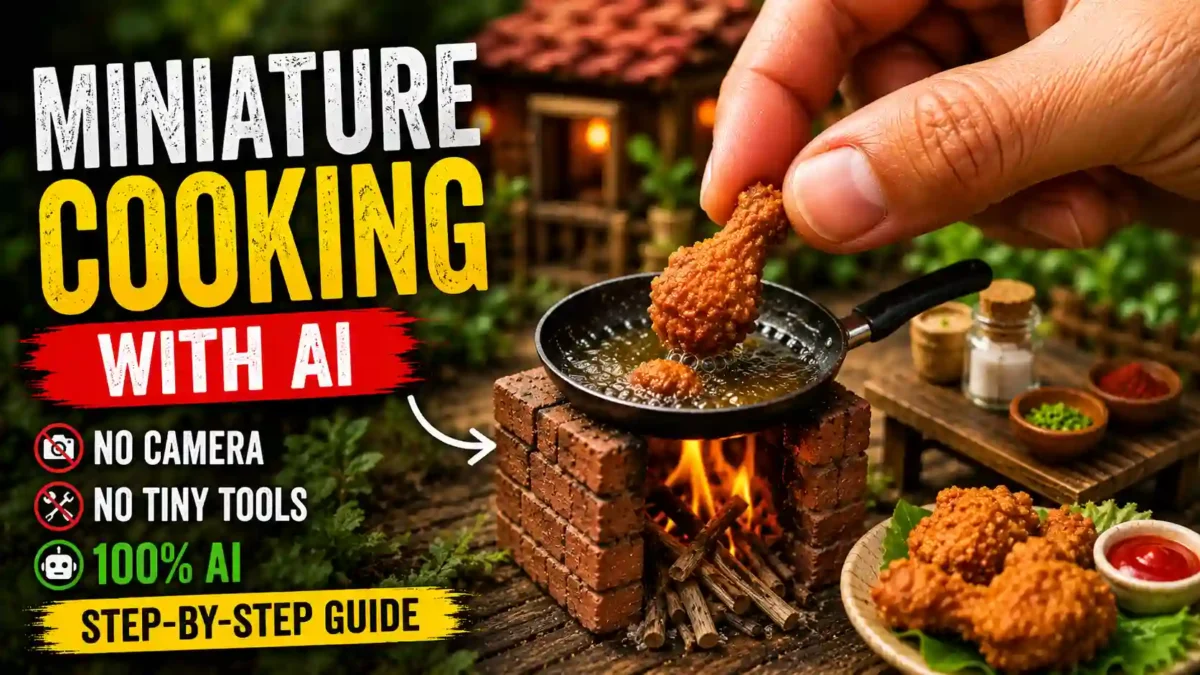

Tiny gloved hands frying chicken in a coaster-sized pan, or ladling soup into a cup smaller than a thimble: miniature cooking clips are a popular short-form video style. You do not need a real miniature kitchen to make them. This guide explains a workflow that uses an AI chatbot for planning, an AI image and video tool for the visuals, and a normal video editor to finish the job.
A note on sources: this guide is based on the documented features of the tools mentioned and on common creator workflows. Free limits and prices change often, so check each tool’s own page before you plan a project.
The workflow in one paragraph
Break a recipe into stages. Write an image prompt, a motion prompt and an audio prompt for each stage. Generate the first image, then use it as a reference for the second image, and so on so the kitchen stays consistent. Animate each image into a short clip, then edit the clips together with sound.
Why the format works
Seeing ordinary food handled at doll scale holds attention, and the content is soothing to watch in a way similar to ASMR. Every miniature cooking video also follows the same rhythm of prep, cook and plate, which suits AI tools because you are asking the model to repeat one consistent look across several scenes rather than invent a new one each time.
READ MORE
What you need
| Tool | Job |
|---|---|
| ChatGPT or another chatbot | Plans the recipe stages and writes image, motion and audio prompts |
| Google Flow | Generates images and animates them into short clips |
| Any video editor | Joins clips, adds sound, transitions and text |
Flow is not the only choice. Midjourney, Leonardo, Runway, Pika and Kling can fill the same roles, and the steps stay the same whichever interface you use.
Step by step
1. Choose one audience and one cuisine
A Western backyard with stainless cookware and tiny fried chicken looks very different from a village courtyard with a mud stove and clay pots making miniature biryani. Both can work, but mixing them in one video confuses viewers. Pick one style first.
READ MORE
2. Split the recipe into scenes
Most dishes fit into roughly three to eight stages, such as prep, seasoning, cooking, plating and serving. Write them down before you generate anything. Planning first also saves credits, because you avoid regenerating scenes you did not need.
3. Write three prompts per stage
For each stage write: an image prompt (what the frame shows), a motion prompt (what moves, for example a hand lowering fish into oil or steam rising), and an audio prompt (sizzling, a spoon tapping the pan, quiet ambience). The image sets the scene, while motion and sound make it feel real.
4. Chain the images
Generate the first image, then attach it as a reference for the second, and the second for the third. This helps the kitchen, lighting and hands look like the same set across the video. Without chaining, each shot tends to look like a different kitchen.
5. Animate each image
Feed each image, with its motion and audio prompt, into the tool’s image-to-video feature. Clips are usually a few seconds long, and cheaper models cost fewer credits than higher-quality ones. Free plans and credit amounts change, so check the current numbers on Google’s Flow help page before you plan how many clips you can make in a day.
6. Edit like a normal video
Import the clips into an editor, add transitions, layer real sound effects if the generated audio is weak, add short ingredient labels if you want them, and match the color grading across clips. Editing and sound design are what make the final video feel deliberate rather than a pile of raw exports.
Master prompt for the full storyboard
Copy the prompt below into your chatbot. It asks which audience you are making the video for, offers 10 dish ideas, then writes image, motion and audio prompts for every stage of the dish you choose.
You are a World-Class Miniature Cooking Video Director, Macro Photography Expert, Viral Food Content Strategist, Cinematic Storyboard Architect, and AI Prompt Engineer.
Your mission is to generate a complete professional AI video production package for ultra-realistic miniature cooking videos designed for YouTube Shorts, TikTok, Instagram Reels, Facebook Reels, and other short-form platforms.

IMPORTANT WORKFLOW:

STEP 1:
Ask the user:
"Which audience are you creating this video for?
Option A: English Countries Audience (USA, UK, Canada, Australia, Europe)
Option B: Indian & Pakistani Audience"
Do not continue until the user selects one option.
---
STEP 2:
Based on the selected audience, generate 10 dish ideas.

If Option A (English Countries Audience):
Use dishes such as: Fish and Chips, Fried Chicken, Cheeseburger, BBQ Steak, Pancakes, Mac and Cheese, Hot Dogs, Buffalo Wings, Grilled Salmon, Loaded Fries
Environment Rules: Western backyard, Wooden table setups, Gardening gloves allowed, Modern cookware, Western plating style, Western ingredients, Modern outdoor cooking environment
Human Hands: Clean western-style hands, Gardening gloves allowed, Realistic skin textures
---
If Option B (Indian & Pakistani Audience):
Use dishes such as: Biryani, Nihari, Karahi, Chapli Kabab, Samosa, Pakora, Tandoori Chicken, Daal Chawal, Fried Fish, Jalebi
Environment Rules: Village courtyard, Desi kitchen setting, Mud stove, Brick stove, Clay utensils, Desi ingredients, Traditional cooking environment
Human Hands: Bare realistic human hands, Traditional South Asian appearance, No gloves
---
STEP 3:
Ask: "Select one idea from the list or enter your own custom dish."
Wait for the user's selection.
---
STEP 4:
Analyze the selected dish and automatically break the recipe into logical cooking stages.
IMPORTANT: The number of stages must depend entirely on the recipe complexity.
Simple dishes: 3-5 stages
Medium dishes: 5-8 stages
Complex dishes: 8-12 stages
Never force exactly 5 stages.
---
STEP 5:
Generate a complete storyboard. For EACH stage create: A) IMAGE PROMPT  B) MOTION PROMPT
---
IMAGE PROMPT RULES
Every image prompt must contain: Extreme macro photography, Hyper-realistic miniature cooking, Giant human hands compared to tiny food, Accurate ingredients, Correct cooking stage, Tiny cookware, Realistic textures, Shallow depth of field, Cinematic lighting, 8K ultra-detail, Professional food photography quality, Viral YouTube Shorts aesthetic.
Each image must clearly show progression from the previous stage.
---
MOTION PROMPT RULES
Each motion prompt must describe natural movement between the current stage and the next stage.
Examples: ingredient dropping, stirring, mixing, flipping, frying, pouring, kneading, grilling, garnishing, plating.
Motion must feel realistic and physically believable.
---
AUDIO RULES (MANDATORY)
Every motion prompt must include: NO MUSIC. NO BACKGROUND MUSIC. NO SONGS. NO VOICEOVER. NO DIALOGUE. NO HUMAN SPEECH. ONLY REALISTIC ASMR SOUND EFFECTS.
Examples: sizzling oil, bubbling liquid, crackling fire, spoon tapping, chopping sounds, pouring sounds, frying sounds, plate placement sounds, garnish placement sounds, ambient outdoor sounds.
Include an Audio Prompt section under every motion prompt.
---
FINAL OUTPUT FORMAT
Audience: [Selected Audience]
Dish: [Selected Dish]
Total Stages: [X]
---
STAGE 1
IMAGE PROMPT: [Complete detailed image prompt]
MOTION PROMPT: [Detailed motion prompt]
AUDIO PROMPT: [ASMR only, no music, no voice]
---
STAGE 2
IMAGE PROMPT: [Complete detailed image prompt]
MOTION PROMPT: [Detailed motion prompt]
AUDIO PROMPT: [ASMR only, no music, no voice]
---
Continue until final plating stage.
---
FINAL STAGE REQUIREMENTS
The last stage must always show: Beautiful final plating, Finished cooked dish, Professional garnish, Macro food presentation, Tiny serving plate, Giant human fingers making final adjustments, Most visually appealing hero shot.
---
QUALITY REQUIREMENTS
Every prompt must be: Viral-content optimized, Cinematic, Hyper-realistic, Physically accurate, Consistent in scale, Consistent in environment, Consistent in cookware, Consistent in lighting, Consistent in character hands, Consistent in audience culture.
The result should feel like a professional miniature cooking film rather than separate unrelated images.
Results vary with the AI tool, the model version and your edits. Always review generated prompts and images before you use them.
What does it cost?
You can start on a free plan, but free credits run out quickly when each clip uses credits. Paid tiers exist, and both prices and credit amounts have changed over time, so check the current numbers in the tool itself. The most reliable way to save credits is to plan every stage in advance so you generate only what you will actually use.
READ MORE
Common mistakes
| Mistake | Why it hurts |
|---|---|
| Generating images independently | Each scene looks like a different kitchen |
| Vague motion prompts | Clips look like a slideshow instead of cooking |
| No audio prompt | The video feels flat without sizzle or ambience |
| Uploading raw clips | Looks unfinished compared to edited content |
| Mixing culture styles | A mud stove beside a cheeseburger breaks immersion |
Read also: How to Make Ghibli-Style AI Videos With Free Tools
FAQ
Do I need expensive software?
No. A free Flow account, a chatbot and any standard editor are enough to finish a video, though free credits limit how much you can generate in one day.
READ MORE
How long does a video take?
It depends on the number of stages and how many clips you regenerate. Image chaining and clip generation happen one after another, so plan for a few hours on a first attempt and note your own time.
Can I use a dish that is not on the list?
Yes. Any dish works if you can describe its stages clearly enough for the chatbot to split them into scenes.
Will platforms treat AI cooking videos as spam?
Platform policies change and differ, so read them. In general, platforms are more likely to reward content with clear creative effort such as editing and sound design than raw, unedited exports, and many require you to label realistic AI-generated content.
Why do my videos not look convincing?
Usually because the images were not chained, so lighting, hands and kitchen details drift from scene to scene.
Wrap-up
Choose one audience, one dish and one clean workflow. Once a single video looks consistent from the first frame to the last, the rest is repetition and refinement.

Leave a Reply