
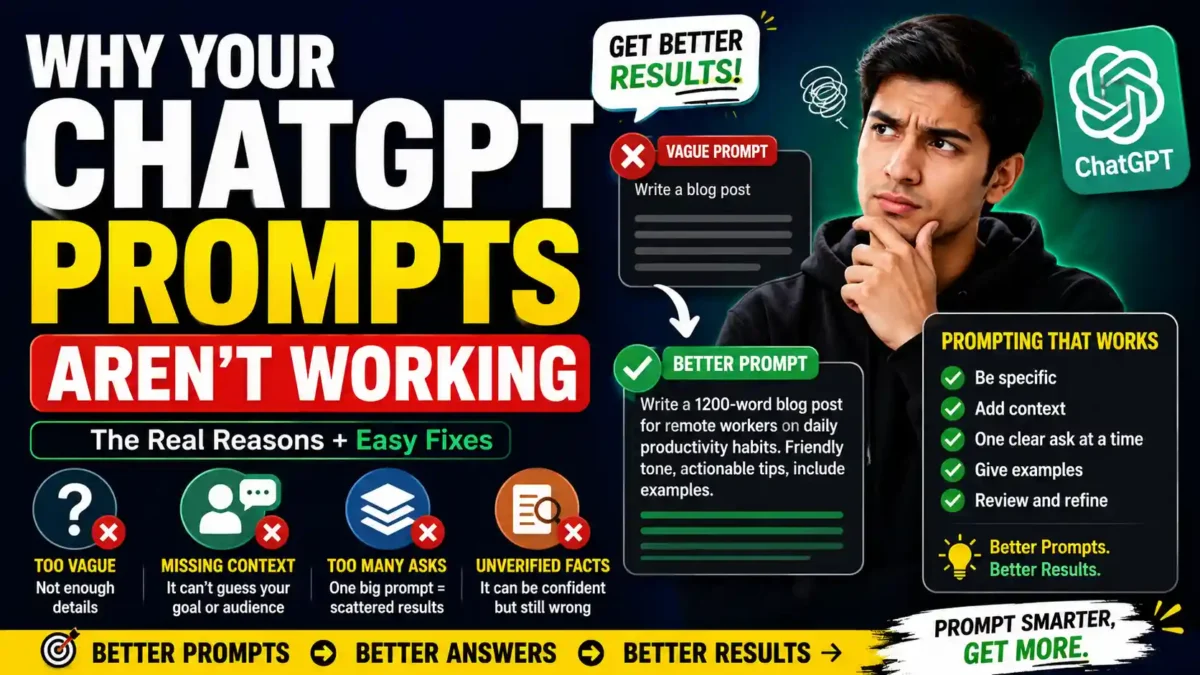

You type something into ChatGPT, get back a response that’s vague, generic, or just plain wrong, and you close the tab thinking the tool is broken. It probably isn’t. Why your ChatGPT prompts aren’t working usually comes down to a small set of habits, and most of them are easy to fix once you see them clearly.
ChatGPT doesn’t fail randomly. It fails predictably, in the same handful of ways, for almost everyone who uses it casually. This article walks through why that happens, what changed with newer models, what a weak prompt actually looks like next to a strong one, and what to do differently starting with your next message. It also includes a reusable prompt template, a 30-day plan, and answers to the questions people ask most often.
The Real Reason Your ChatGPT Prompts Don’t Work
ChatGPT doesn’t read your mind, and it doesn’t remember your last conversation unless you’re in the same thread. Every new chat starts from zero context. So when you type “write me a LinkedIn post” and get something bland, that’s not the model malfunctioning. That’s the model doing exactly what a system with no context should do: guessing at the middle of the road.
ChatGPT and similar large language models work as pattern matchers. Give it a thin prompt, and it pulls from the most common, most generic pattern it has for that type of request. Give it specifics — audience, tone, length, format — and it narrows down to something usable. This is consistent with what most prompt engineering guides are now calling context engineering rather than prompt engineering, because the real skill is loading the right information in, not finding a magic phrase.
One thing that stood out during research for this piece is how often the same five or six mistakes show up across completely unrelated guides, from developer-focused prompting playbooks to casual “why doesn’t ChatGPT understand me” posts. Nobody’s really disagreeing about the causes. They’re just describing the same problems from different angles, which suggests the underlying issue is pretty stable even as the models themselves keep changing.
There’s also a psychological piece worth naming. When a person gives you a vague instruction, you’d normally ask a follow-up question. ChatGPT, in a single-shot prompt, usually just answers instead, even when “I need more information” would be the honest response. So the burden of clarifying sits entirely on you.
What’s Actually Going Wrong When ChatGPT Gives You a Bad Answer
A handful of habits account for most disappointing ChatGPT results. None of them require technical knowledge to fix, and you’ve probably done at least two of them this week.
READ MORE
1. You’re Being Too Vague
“Write a blog post about productivity” gives ChatGPT almost nothing to work with. What kind of productivity? For whom? How long? What tone? Without those answers, you get a Wikipedia-style summary that could apply to anyone, which means it resonates with no one. Compare that to “write a 1,200-word blog post on productivity habits for remote workers at early-stage startups,” and the output shifts immediately. The topic didn’t change. The precision did.
2. You’re Skipping Context It Can’t Guess
ChatGPT doesn’t know your industry, your audience, or what you’ve already tried unless you say so. Every conversation is a stranger meeting you for the first time. Telling it who the response is for and what problem you’re actually solving, before asking for output, changes the ceiling on what it can produce. This mistake shows up most often in casual use, since it feels obvious to the person typing and invisible to the model reading.
3. You’re Stacking Too Many Asks Into One Prompt
Asking ChatGPT to summarize an article, suggest improvements, write a tweet thread, and generate an image prompt in one message sounds efficient. In practice, focus dilutes across that many instructions, even with today’s larger context windows, and the model tends to skip, weaken, or blur pieces of the request. One clear ask per prompt, or a short numbered list of asks handled one at a time, tends to outperform a single sprawling request. If you notice the response only addressed half of what you asked, that’s usually the cause, not a bug.
4. You’re Trusting It With Facts It Can’t Verify
ChatGPT can sound confident while being wrong, especially on anything time-sensitive, niche, or statistical. If your question depends on current events, specific numbers, or specialized industry knowledge, you need to feed that information into the prompt yourself rather than assuming the model already has it. This matters more than it used to, since even recent models still carry a training cutoff, and the newer models have gotten better at sounding authoritative, which paradoxically makes the subtle mistakes harder to catch.
5. You’re Treating One Prompt as Your Only Shot
A lot of frustration comes from people writing one prompt, disliking the result, and giving up on the whole task rather than the prompt. ChatGPT responds well to iteration. Asking it to revise a specific part, tighten the tone, or try a different angle almost always beats starting over from a blank page. Treating the first response as a draft rather than a verdict changes the entire experience of using the tool.
6. You’re Assuming a Better Model Needs a Better Prompt Less
Newer models are more literal about following instructions. That means a poorly specified prompt gets executed poorly with more confidence, not corrected quietly. A vague instruction that older models might have hedged on can now produce a confidently wrong answer. The fix is the same — be specific — but the stakes for being vague are higher than they used to be.
A Weak Prompt Versus a Strong One, Side by Side
It helps to see this in practice rather than in theory. A weak prompt might read: “Help me write an email to my team about the deadline change.” It’s not a bad instinct, but it leaves almost everything open. Who’s on the team? Is the deadline moving earlier or later? What tone fits this workplace, formal or casual? ChatGPT will still answer, but it has to invent the missing pieces, and there’s a good chance at least one of its guesses won’t match your actual situation.
A stronger version of the same request might read: “Write a short, friendly email to a five-person marketing team letting them know the product launch deadline moved from Friday to the following Wednesday. Explain briefly that this is due to a vendor delay, keep it under 120 words, and end with an offer to answer questions in the next stand-up.” Nothing about that is technical. It’s just complete. The output stops being a guess and starts being a draft you can actually send with minor edits.
What changed between those two versions wasn’t cleverness. It was information. That’s the pattern worth internalizing more than any specific wording trick: ChatGPT’s output quality tracks pretty closely with how much relevant, specific information you hand it up front.
| Weak Prompt | Strong Prompt | What’s Missing |
|---|---|---|
| “Write a LinkedIn post about marketing.” | “Write a 150-word LinkedIn post for B2B SaaS founders about why cold outreach still works in 2026. Include one specific stat and end with a question.” | Audience, length, angle, format, call to action |
| “Help me with this email.” | “Rewrite this email to be more concise and less apologetic. Keep the same three requests but cut the word count by 40%.” | Specific goal, constraint, tone direction |
| “Summarize this article.” | “Summarize this article in five bullet points aimed at someone who has never heard of the topic. Avoid jargon and define any technical term you use.” | Format, audience, tone, vocabulary constraints |
| “Give me ideas for a YouTube video.” | “Give me five YouTube video ideas for a channel about home cooking for beginners. Each idea should have a hook in the first sentence and be filmable in under 30 minutes.” | Niche, audience, format, constraints |
How Is Prompting Different With 2026 Models?
This is where a lot of advice from a year or two ago quietly stopped applying. Newer GPT-5 family models handle longer context and follow structured instructions more reliably than earlier versions, but that doesn’t mean prompting stopped mattering. It shifted.
READ MORE
The clearest signal on this comes from OpenAI’s own guidance around its GPT-5.6 rollout. According to a widely cited breakdown of that guidance, leaner prompts scored 10 to 15 percent higher on evaluations than repetitive ones, while cutting token use by up to two-thirds. The stated rule was simple: state each instruction exactly once. Older models sometimes needed the same instruction repeated three different ways to stick. Newer ones don’t, and repeating yourself can actually hurt the response instead of reinforcing it.
There’s also a reasoning-effort dimension now that didn’t exist in the same way before. Some current-generation models let you dial reasoning up or down, either through an API parameter or by prompting phrases like “think step by step” versus “output the result directly, no preamble.” Reaching for heavier reasoning on a simple formatting task wastes time and can even introduce overthinking where a direct answer would have been cleaner. On the other hand, a genuinely complex request, like refactoring logic or planning a multi-step process, benefits from explicitly asking the model to plan before it writes.
After comparing several current prompting guides side by side, the difference in advice was smaller than expected. The specifics of model names change fast, and it’s easy to feel like you’re always a version behind. The underlying principle — be specific, structure your ask, and don’t overload a single prompt — has stayed remarkably stable across model generations. That consistency is probably the most useful thing to hold onto, since it means you’re not starting from scratch every time a new model ships.
The Fix That Actually Helps
If there’s one change that improves ChatGPT output more than any single trick, it’s this: tell it the who, what, and format before you ask for the thing itself. Not a longer prompt. A more complete one.
A useful structure looks like this: give the context first (who this is for, what you’re trying to accomplish), then the specific task, then any constraints (length, tone, format, things to avoid), then what the output should look like. You don’t need special syntax or a paid prompting course to do this. You need to stop assuming ChatGPT can fill in blanks you haven’t told it about.
The template in practice:
“I’m working on [context: what this is, who it’s for]. I need you to [task: specific output]. The tone should be [tone]. Keep it under [length]. Format it as [format]. Avoid [things to avoid]. Here’s an example of what good looks like: [paste example].”
It also helps to treat a weak result as a signal to revise the prompt, not the whole task. If the output missed the mark, look at what information was missing rather than starting over from a blank page. Was the audience unclear? Was the format left open? Did you ask for five things at once? Usually the fix is a single added sentence, not a full rewrite.
Building a small personal library of prompts that already worked for tasks you repeat — weekly reports, social captions, meeting summaries — also compounds over time. You’re swapping in new details instead of reinventing the structure, which saves the back-and-forth that fuels most “ChatGPT isn’t working” frustration.
Common Assumptions That Quietly Work Against You
A few assumptions keep resurfacing in how people talk about ChatGPT, and most of them make the tool feel less reliable than it actually is.
READ MORE
- “A better model means less need for a good prompt.” It’s the opposite in some ways. Newer models follow instructions more literally, so a vague prompt produces a confidently vague answer instead of a hedged one.
- “Longer prompts are automatically better.” They’re not. Padding a request with caveats or repeated instructions dilutes the parts that actually matter. Completeness beats length.
- “The model failed, so the tool is bad.” Usually the prompt was missing something the model couldn’t guess. Reframing a bad response as feedback rather than a verdict changes how quickly you improve.
- “Prompt engineering is a magic set of phrases.” It’s not. It’s about thinking clearly about what you want before you type.
A 30-Day Plan to Improve Your ChatGPT Results
Week 1: Diagnose Your Habits
- Look back at your last 10 prompts. Note which of the six mistakes above show up most often.
- Rewrite three of them using the context + task + constraints + format structure.
- Compare the outputs side by side.
Week 2: Build Your Personal Prompt Library
- Identify three tasks you repeat weekly (emails, summaries, social posts).
- Write one reusable prompt for each that includes context, task, and format.
- Save them in a notes app or document for quick access.
Week 3: Practice Iteration
- For every prompt you write this week, treat the first response as a draft.
- Ask for at least one revision before accepting an output.
- Experiment with asking for three variations of the same prompt.
Week 4: Test Different Reasoning Levels
- Try “think step by step” on a complex task and compare to a direct request.
- Try “output the answer directly, no preamble” on a simple formatting task.
- Note which type of task benefits from which approach.
Frequently Asked Questions
Why does ChatGPT give generic answers even when I’m specific?
Usually one required detail is still missing, most often the intended audience or the desired format. Specificity in tone or topic alone doesn’t help if the model still doesn’t know who the response is for or how it should be structured.
READ MORE
Do I need to learn special prompt formulas to get better results?
No. Clear, complete instructions written in plain language outperform rigid formulas in most everyday use. Formal frameworks matter more for developers building repeatable, production-scale prompts than for someone asking ChatGPT for help with an email.
Why did a prompt that worked before suddenly stop working as well?
Model updates change behavior, sometimes significantly. A prompt tuned for one model version, especially one that relied on repeating instructions or heavy hedging, can underperform on a newer model that responds better to leaner, single-pass instructions.
Should I put my question at the beginning or end of a long prompt?
For most ChatGPT prompts, leading with the context and following with the specific ask works well, especially once you’re including background material like documents or data. If you’re pasting in a lot of reference material, put your actual question after it rather than before.
Is it my fault if ChatGPT hallucinates a fact?
Not entirely, but you can reduce it. Providing your own up-to-date facts and asking the model to work only from what you’ve supplied cuts down on confident, incorrect answers, particularly for anything time-sensitive or statistical.
Does it help to tell ChatGPT to act as a specific role, like a copywriter or teacher?
It can, mainly because it nudges the model toward a consistent tone and set of priorities without you having to spell every one of them out. It’s a shortcut for context, not a replacement for it. Pairing a role with real specifics still outperforms the role instruction alone.
How long should my prompt be?
Long enough to include context, task, constraints, and format, and no longer. Most everyday prompts land between 40 and 150 words. If you’re past 200 words and haven’t said anything new, cut it.
Can I reuse the same prompt for different tasks?
You can reuse the structure, but not the content. A prompt template that works for a weekly report won’t work for a social post unless you swap the context and constraints. The format is reusable; the details are not.
What should I do if ChatGPT keeps ignoring part of my request?
Split the request into separate messages. Ask for one thing at a time. When a model drops part of a multi-part ask, it’s usually because the instruction list was too long for a single pass, not because the model is broken.
Conclusion
Why your ChatGPT prompts aren’t working almost never comes down to the tool itself. It comes down to missing context, requests stacked too high, or instructions the model has to guess at. The fix isn’t a secret formula. It’s giving ChatGPT the same information you’d give a new coworker on their first day: who this is for, what you actually need, and what the finished thing should look like.
Do that consistently, treat a weak first answer as a draft instead of a dead end, and the gap between “this AI isn’t that smart” and “this is genuinely useful” closes fast. The tool has gotten better every year. The habit of telling it what you actually want hasn’t caught up for most users yet — and that’s the opportunity.



Leave a Reply