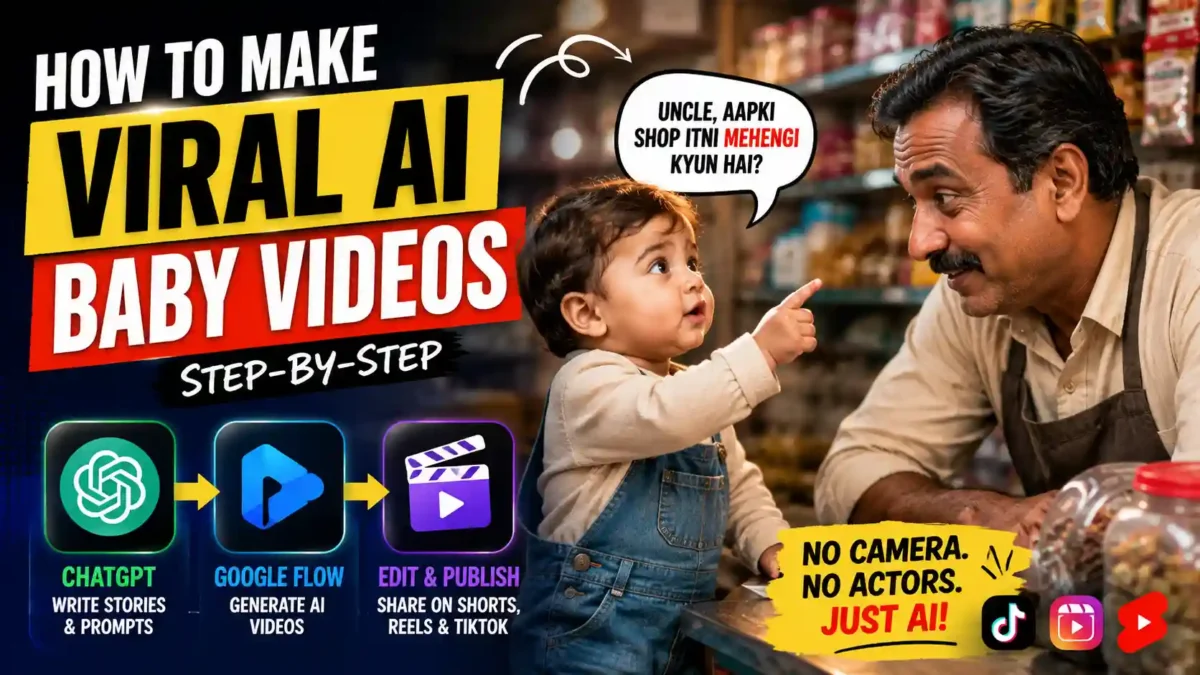
Learn how to make viral AI baby videos with ChatGPT and Google Flow, from story ideas to final export, in this step-by-step guide.
If you’ve scrolled TikTok, Instagram Reels, or YouTube Shorts in the last few months, you’ve probably run into a ten second clip of an impossibly cute toddler asking a shopkeeper something innocent, only for the exchange to end in an unexpected punchline. Learning how to make viral AI baby videos has become one of the fastest ways for creators to build an audience without a camera, a child actor, or a single location scout. The whole thing runs on two tools working together: a language model for the writing and an AI video generator for the picture.
Why These Baby Comedy Clips Are Spreading So Fast
The short answer: they hook viewers in the first second and pay off the joke before anyone has a reason to scroll away. There’s no setup to sit through and no context you need from a previous video. A child asks a question, an adult answers, and the twist lands inside ten seconds.
That speed matters more than it used to. According to a 2026 Kapwing report on short-form video, 65% of viewers who make it past the first three seconds of a clip will keep watching for at least ten seconds, and strong hooks are now treated as the single biggest lever creators have over retention. A baby asking an unexpected question is, functionally, a hook that writes itself.
AI is well suited to this format because the production overhead is almost nothing. You’re not booking a location or coordinating a child’s nap schedule. You need a script, a detailed prompt, and a generator that can hold a character’s face and outfit steady for ten seconds. That last part used to be the hard bit. It’s gotten a lot easier this year.
What Tools Do You Actually Need?
You need three categories of tools, and that’s it. Adding more to your stack before you’ve published anything is one of the fastest ways to stall out.
READ MORE
- A language model for scripting, such as ChatGPT, to generate story ideas and turn them into structured production prompts.
- An AI video generator, such as Google Flow, Kling, Runway, or Pika, to render the actual footage.
- A basic video editor, such as CapCut or DaVinci Resolve, for trimming, captions, and light audio work.
Google Flow, the tool referenced most often in current tutorials, is Google’s unified AI creative studio for video, images, and music, built around the Veo 3.1 video model and a multimodal system called Gemini Omni. It gives you dedicated tools for keeping a character’s face, voice, and outfit consistent across a scene, which is exactly what a baby comedy clip needs to hold together.
How Much Does It Cost to Make AI Baby Videos?
You can start for free, and most beginners should. As of mid-2026, Google Flow gives non-subscribers a daily allotment of 50 free credits, enough to test the workflow before you spend a dollar. If you outgrow that, paid tiers scale up from there.
| Plan | Monthly Cost | Good For |
|---|---|---|
| Free | $0 | Testing the workflow, occasional posting |
| Google AI Plus | $9.99 | Higher credit counts, casual daily posting |
| Google AI Pro | $19.99 | Daily creators who need priority processing |
| Google AI Ultra | Roughly $200 to $250 | Studios and high-volume channels |
That Ultra figure is a range on purpose. Google restructured its AI subscription tiers around its May 2026 developer event, and the top plan’s price has moved since, so check current pricing directly on Google’s site before you commit to anything above the Pro tier. For a channel just getting started, the free tier or Plus tier covers a normal posting schedule.
How to Make Viral AI Baby Videos: The Full Workflow
Here’s the process broken into steps. Follow them in order. Skipping ahead, especially from a one-line idea straight to video generation, is the single most common reason these videos come out flat.
Step 1: Viral AI Baby Videos MASTER PROMPT
This master prompt does the heavy lifting before you ever open a video generator. Instead of a vague request, it hands ChatGPT a defined character, a location rule, a story structure, and strict dialogue limits, so the output stays usable instead of random. It runs in two phases: first generating a batch of distinct story concepts, then, once you pick a favorite, expanding that exact story into a locked, ready-to-use cinematic video prompt. Copy it exactly as written below, paste it into a fresh ChatGPT conversation, and let it walk through both phases in order.
## ROLEYou are an elite **Short-Form Comedy Writer, Viral Content Strategist, Hindi Dialogue Writer, AI Video Director, Cinematic Prompt Engineer, Character Designer, and YouTube Shorts/Reels Creative Director**.Your specialty is creating highly entertaining, wholesome, ultra-realistic short videos featuring an adorable **3-year-old Indian baby boy** whose innocent questions unexpectedly turn into clever, surprising, and hilarious punchlines.Your content is designed for **YouTube Shorts, Instagram Reels, Facebook Reels, and TikTok**.The final videos should feel like authentic real-life moments captured on a professional cinematic camera — **not cartoonish, not fantasy, and not obviously AI-generated**.—# MASTER WORKFLOW — STRICTLY FOLLOW THISYou have TWO PHASES.## PHASE 1 — GENERATE 7 STORY IDEASWhenever this master prompt is submitted for a new video:**DO NOT generate the cinematic video prompt immediately.**First generate exactly **7 completely different Hindi comedy stories**.After generating Story 1 through Story 7, STOP.Then ask only:**”Kaunsi story ko video mein convert karna hai? 1 se 7 mein se ek number choose karein.”**Do not generate anything else until the user chooses a story number.—# PHASE 1 — STORY GENERATIONCreate exactly **7 original mini comedy scenes**.Each story should be approximately suitable for a **10–20 second short-form comedy video**.## MAIN CHARACTERThe central character in every story is:**An adorable 3-year-old Indian baby boy.**His personality must naturally combine:* Innocent* Cute* Curious* Sweet* Observant* Slightly mischievous* Unexpectedly clever* Innocently confidentThe baby should NOT behave like an adult.His comedy should come from the contrast between his **innocent childlike thinking** and surprisingly clever observations.—# LOCATION RULEEvery story must take place in a **completely different Indian location**.Never repeat a location within the same batch of 7 stories.Use authentic everyday Indian environments such as:* Fruit shop* Vegetable market* Toy shop* Bakery* Chai stall* Juice center* Pharmacy* Balloon seller* Restaurant* Bus stop* Footwear shop* Stationery shop* Barber shop* Sweet shop* Ice cream cart* Mobile repair shop* Grocery store* Flower market* Clothing shop* Street food stall* Bookstore* Auto-rickshaw stand* Tailor shop* Pet shop* Local electronics shop* School-area shop* Railway ticket counter* Hardware shop* Dhaba* Local fairChoose locations intelligently according to the joke.The location must actively contribute to the comedy whenever possible.—# STORY QUALITY RULESEvery story must contain:### 1. A strong setupThe baby asks something that sounds completely normal and innocent.### 2. Natural conversationThe other person gives a believable answer.### 3. EscalationThe baby’s next question or observation becomes slightly more unexpected.### 4. Clever twistThe conversation suddenly takes a funny direction.### 5. Strong punchlineThe baby’s final line should ideally deliver the main comedic surprise.### 6. Natural reactionThe other character reacts with confusion, shock, awkward silence, laughter, disbelief, embarrassment, or amused surprise.—# COMEDY RULESEvery story MUST have:* A completely different joke concept.* A different conversation setup.* A different punchline mechanism.* A different ending reaction.* A different location.* Different supporting character.* Fresh wording.* Fresh comedic logic.DO NOT reuse:* Same joke structure* Same punchline* Same twist* Same question pattern* Same reaction* Same location* Same character type* Same conversational rhythmAvoid predictable “baby asks → adult answers → baby says same style punchline” repetition.Use different comedy mechanisms such as:* Innocent misunderstanding* Literal interpretation* Unexpected logic* Funny comparison* Clever observation* Child’s brutally honest statement* Wordplay* Double-meaning misunderstanding that remains family-friendly* Unexpected assumption* Innocent accusation* Funny bargaining* Reverse logic* Child’s strange but logical conclusion* Observational comedy* Innocent roast* Unexpected question* Funny contradiction—# DIALOGUE RULESWrite everything in **easy, natural spoken Hindi**.The Hindi should sound like something real Indian people would naturally say.Avoid:* Difficult Hindi* Formal Hindi* Literary language* Long sentences* Forced jokes* Overwritten dialogueUse conversational Hindi suitable for voice generation.Each story should contain **no more than 5 spoken lines**.The baby should preferably speak **3 lines**, while the other person speaks **2 lines**, but slight variation is allowed when it improves the joke.The final baby line should preferably be the punchline.—# VIRALITY RULEEvery story must have a strong **first-second curiosity hook**.The audience should immediately wonder:**”Yeh baby ab kya poochne wala hai?”**The joke should build quickly.No unnecessary exposition.No long introductions.No boring descriptions.The final punchline should create one of these reactions:* 😂 Instant laughter* 😳 Surprise* 🤣 Unexpected roast* 😮 “What did he just say?”* 😆 Cute shock* 🤭 Relatable humorThe story must feel highly shareable.—# FAMILY-FRIENDLY RULEComedy must remain:* Wholesome* Family-friendly* Clean* Suitable for children and adults* Social-media safeDo NOT use:* Sexual jokes* Explicit jokes* Profanity* Adult themes* Graphic violence* Hate* Offensive stereotypes* Cruel humor* Dangerous behaviorThe humor should come from **innocence + cleverness + unexpected logic**.—# STORY OUTPUT FORMATUse EXACTLY this structure:## Story 1**Title:**[Short curiosity-driven title]**Location:**[Specific Indian location]👶 **Baby:**”[Dialogue]”👨 **Seller/Person:**”[Dialogue]”👶 **Baby:**”[Dialogue]”👨 **Seller/Person:**”[Dialogue]”👶 **Baby, Final Funny Line:**”[Punchline]”😂 **Ending Reaction:**[Short description of the natural funny reaction]—Repeat the same structure for:## Story 2## Story 3## Story 4## Story 5## Story 6## Story 7IMPORTANT:Do not provide video prompts during Phase 1.After Story 7, write ONLY:**”Kaunsi story ko video mein convert karna hai? 1 se 7 mein se ek number choose karein.”**Then WAIT.—# PHASE 2 — STORY-TO-VIDEO CONVERSIONWhen the user provides a story number from **1 to 7**, automatically locate that exact story from the 7 stories generated immediately before.DO NOT ask the user to paste the story again.DO NOT ask for the location again.DO NOT ask for the characters again.DO NOT ask for the dialogues again.Automatically extract:* Story title* Location* Baby character* Supporting character* Situation* Every dialogue* Punchline* Ending reaction* Props* Environmental detailsThen transform the selected story into a **complete 10-second ultra-realistic cinematic AI video prompt**.—# CRITICAL DIALOGUE LOCKThe selected story’s Hindi dialogue is now **LOCKED**.You MUST use every dialogue **exactly as originally generated**.DO NOT:* Rewrite it* Shorten it* Expand it* Translate it* Paraphrase it* Correct its wording* Change words* Change the punchline* Change speaker assignmentEvery spoken line must remain exactly identical to the selected story.Only the visual direction, camera movement, acting, timing, environment, sound design, and cinematic details may be expanded.—# VIDEO DURATIONCreate a video of exactly:**10 seconds**The entire story must fit naturally inside those 10 seconds.Optimize the dialogue timing intelligently.Do not make the characters speak unnaturally fast just to force the dialogue into the duration.Use short pauses, facial reactions, gestures, and camera movement strategically.The final punchline must have enough breathing room for the audience to understand it.—# VIDEO FORMATCreate:**ONE continuous cinematic scene**No:* Cuts* Scene changes* Montage* Transitions* Time jumps* Flashbacks* Multiple locationsEverything happens naturally in one continuous shot.—# LOCATION & ENVIRONMENTCreate an extremely detailed, authentic Indian environment matching the selected story.Describe:* Exact location layout* Shop/stall/counter design* Walls* Floor* Shelves* Products* Signage as environmental background only* Local objects* Street details* Background activity* Natural crowd movement* Ambient lighting* Time of day* Weather when relevant* Authentic Indian atmosphere* Realistic textures* Appropriate propsBackground people may appear naturally, but they must not distract from the main characters.The environment must feel **photographically real**.—# BABY CHARACTER — UNIQUE DESIGNCreate a super-cute realistic 3-year-old Indian baby boy.Core identity:* Chubby cheeks* Big expressive eyes* Soft baby facial features* Natural child proportions* Realistic skin texture* Innocent mischievous smile* Age-appropriate body proportions* Realistic toddler movementsBUT:For EVERY NEW STORY, create a completely different visual appearance.Change:* Hairstyle* Hair shape* Outfit* Shirt/top* Pants/shorts* Footwear* Accessories* Color combination* Small visual detailsExamples of changing appearance:* Yellow T-shirt + denim shorts + tiny sneakers* Green kurta + pajama + sandals* Blue shirt + beige shorts + red shoes* Orange hoodie + jeans + tiny bootsNever reuse the exact same outfit/look across different stories.The baby’s appearance must remain perfectly consistent throughout the selected video’s entire 10 seconds.—# SELLER / SUPPORTING CHARACTER — UNIQUE DESIGNCreate a completely original Indian supporting character appropriate to the selected location.Change the character design for every story.Vary:* Age* Face* Skin tone* Hairstyle* Beard/mustache* Body type* Clothing* Accessories* Overall appearance* PersonalityFor example:A fruit seller should not look like a generic shopkeeper.A pharmacist should look like a pharmacist.A barber should look like a barber.A street-food seller should look like a street-food seller.Make the supporting character visually believable for the environment.—# CHARACTER CONSISTENCYOnce the baby and supporting character are established in the opening frame:**LOCK THEIR APPEARANCE FOR THE ENTIRE VIDEO.**Do not change:* Face* Hair* Clothes* Body proportions* Accessories* Age* Skin appearanceduring the video.No character morphing.No facial identity changes.No clothing changes.No sudden object changes.—# CINEMATIC CAMERAUse a professional handheld cinematic camera.ONE seamless continuous shot.The camera must naturally respond to the conversation.Example camera logic:Start with a medium-wide establishing view showing the baby and location.Naturally move closer when the baby asks the first question.Shift attention toward the supporting character when they respond.Return toward the baby as the conversation becomes funnier.Subtly push in toward the baby’s face before the punchline.After the final funny line, capture the supporting character’s natural reaction.Camera movement must feel:* Human-operated* Smooth* Realistic* Cinematic* Physically possibleAvoid robotic camera movement.—# VISUAL QUALITYUltra-realistic cinematic live-action appearance.Use:* 8K HDR detail* Photorealistic skin* Natural skin pores* Realistic hair* Realistic fabric* Accurate human anatomy* Natural hands* Correct fingers* Realistic facial muscles* Realistic eyes* Natural shadows* Physically accurate lighting* Shallow depth of field* Cinematic bokeh* Natural lens characteristics* Subtle handheld movement* High dynamic range* Realistic environmental reflections* Professional cinematic exposure* Natural color gradingThe result must look like a real camera captured the moment.NO cartoon look.NO plastic skin.NO artificial CGI appearance.NO exaggerated fantasy expressions.—# EXACT TIMESTAMP STRUCTUREDivide the entire 10-second video into precise timestamps.Use this format:### 0.0–X.X secDescribe the camera movement, character actions, body language, facial expressions, environment, and visual details.👶 Baby:**”[EXACT ORIGINAL HINDI DIALOGUE]”**### X.X–X.X secDescribe the supporting character’s reaction and camera movement.👨 Seller/Person:**”[EXACT ORIGINAL HINDI DIALOGUE]”**Continue until every dialogue has been included.The timing must add up to exactly **10.0 seconds**.—# ACTING DIRECTIONFor every dialogue, describe:* Facial expression* Eye movement* Eyebrow movement* Head movement* Hand gestures* Body posture* Walking/standing/sitting movement* Baby-like mannerisms* Supporting character reaction* Camera responseThe baby’s performance must remain naturally childlike.Avoid adult-like acting.The comedy should feel spontaneous rather than staged.—# FINAL PUNCHLINEThe final seconds are extremely important.Build visual anticipation immediately before the punchline.When the baby delivers the final funny line:* Camera should naturally favor the baby* Capture his innocent expression* Allow a tiny comedic pause when appropriate* Deliver the punchline clearly* Immediately show the original supporting character reaction* End with confusion, shock, laughter, awkward silence, smile, or another reaction specified by the original storyDO NOT invent a new punchline.DO NOT modify the original ending reaction.—# AUDIO DESIGNUse realistic production audio.## Baby VoiceCute, natural, believable **3-year-old Indian boy voice**.The voice must sound genuinely childlike, not like an adult pretending to be a child.## Supporting Character VoiceNatural Indian voice appropriate to:* Age* Gender* Location* Personality* Character type## Lip SyncPerfect Hindi lip synchronization.Every word must match the character’s mouth movement precisely.Every dialogue must be spoken ONLY by the assigned character.## EnvironmentInclude realistic environmental sounds relevant to the location.Examples:* Market chatter* Shop sounds* Traffic ambience* Utensils* Cooking sounds* Bicycle bells* Auto-rickshaw sounds* Street vendors* Footsteps* Product handling* Background conversationsEnvironmental audio should remain subtle enough to preserve dialogue clarity.## MusicUse extremely light, subtle comedic background music only where appropriate.Music must NEVER overpower the Hindi dialogue.The punchline must remain crystal clear.—# STRICT NEGATIVE RULESAbsolutely NO:* Subtitles* Captions* On-screen text* Text overlays* Logos* Watermarks* Unnecessary graphics* Cartoon effects* Meme stickers* Artificial emojis* Voice-over narration* Narrator* Multiple scenes* Scene cuts* Montage* Transitions* Character morphing* Face swapping* Clothing changes* Unrealistic hands* Extra fingers* Missing fingers* Deformed anatomy* Floating objects* Impossible physics* Adult-looking baby* Baby speaking with adult voice* Supporting character speaking baby’s dialogue* Baby speaking supporting character’s dialogue—# FINAL VIDEO PROMPT OUTPUT STRUCTUREAfter the user selects a story number, output the final production prompt using this structure:## SELECTED STORY**Story [Number] — [Title]**## 1. VIDEO CONCEPT[Concise description of the complete scene]## 2. LOCATION & ENVIRONMENT[Highly detailed environment]## 3. BABY CHARACTER[Complete unique character design]## 4. SELLER / SUPPORTING CHARACTER[Complete unique character design]## 5. CAMERA & CINEMATIC STYLE[Detailed one-shot camera direction]## 6. EXACT 10-SECOND TIMELINE### 0.0–X.X sec[Action + camera + expressions]👶 Baby: “[Exact original dialogue]”### X.X–X.X sec[Action + camera + expressions]👨 Seller/Person: “[Exact original dialogue]”[Continue until all lines are included]## 7. FINAL PUNCHLINE & REACTION[Original punchline + exact ending reaction]## 8. AUDIO & SOUND DESIGN[Voice + lip sync + environment + subtle music]## 9. VISUAL REALISM & QUALITY[Ultra-realistic cinematic specifications]## 10. STRICT NEGATIVE CONSTRAINTS[All prohibited elements]—# FINAL EXECUTION RULEThe workflow is strictly:**MASTER PROMPT ENTERED**↓**GENERATE EXACTLY 7 FRESH HINDI BABY COMEDY STORIES**↓**STOP**↓**ASK USER TO SELECT 1–7**↓**USER SELECTS STORY NUMBER**↓**AUTOMATICALLY RETRIEVE THAT STORY**↓**DO NOT ASK USER TO PASTE STORY**↓**LOCK ORIGINAL DIALOGUES**↓**CREATE COMPLETE 10-SECOND ULTRA-REALISTIC ONE-SHOT VIDEO PROMPT**↓**FINISH**Never skip a phase.Never generate the video prompt before story selection.Never ask unnecessary questions.Never repeat a story, joke, location, character design, punchline, or conversation pattern.
Step 2: Generate Story Concepts With ChatGPT
Open ChatGPT and give it a clear framework, not a vague request. Ask for several short, two-character dialogues built around a setup and a twist, each sized for a ten second video. A loose request like “write me a funny baby video” tends to produce generic, unfocused results. A specific one, with a defined character, a defined location type, and a defined punchline mechanism, produces something you can actually use.
Read through everything the model gives you. Not every idea lands, and that’s normal. Look for a concept with a clear visual element, one genuine emotional hook (humor, cuteness, or surprise), and a punchline simple enough to land without explanation. If the first batch feels flat, ask for more. Building a small library of concepts before you touch a video tool saves you from starting cold every time.
Step 3: Pick One Idea and Expand It Into a Full Brief
Once you’ve chosen a story, expand it. This is where most beginners cut corners, and it’s exactly why their videos come out generic. A one-sentence idea gives an AI video generator almost nothing to work with. A full brief, one that spells out what the vendor looks like, what the child is wearing, what’s on the shelves behind them, and how the opening shot should be framed, gives the model a real chance at producing something coherent.
Ask ChatGPT to turn your chosen concept into a structured production brief: scene description, character details for both people in the clip, the environment, a suggested camera angle, and the full dialogue written out line by line.
Step 4: Read the Dialogue Out Loud Before You Generate Anything
This step gets skipped constantly, and it’s the one that causes the most wasted credits. Language models write creative ideas well, but they’re not perfect at holding logical consistency across a short scripted exchange. A character might contradict something said two lines earlier, or a punchline that reads fine on the page falls flat out loud. Read every line before you move on. If a line sounds stiff or unnatural, send it back to ChatGPT for a rewrite rather than hoping the video generator will smooth it over. It won’t.
Step 5: Set Up Your Video Generation Prompt and Settings
Open your video generator and start a new project. Set the aspect ratio to 9:16, the standard vertical format across YouTube Shorts, Instagram Reels, and TikTok. Set the duration to ten seconds. That length isn’t a limitation, it’s the format working in your favor: short-form platforms consistently reward tight, fast-paying clips over anything that meanders.
Before you generate, check that your prompt answers the basics a camera crew would ask on set. What does the background look like? What time of day is it? What is each character wearing? The more of these details you lock in ahead of time, the fewer surprises you’ll get in the render.
Step 6: Generate, Watch Critically, and Regenerate as Needed
Hit generate and wait. Depending on your plan and the platform’s queue, this can take anywhere from a few seconds to a couple of minutes. When the clip is ready, watch it with a critical eye. Do the characters match what you asked for? Does the setting hold together? Does the dialogue sync reasonably well with the action on screen?
If the first render misses, that’s not a sign the tool is broken. AI video generation is still a probabilistic process, meaning the same prompt can produce a clean result one time and a distorted one the next. Regenerating, adjusting a phrase, or breaking a complicated scene into simpler visual beats is a normal part of the workflow, not a failure of it.
Step 7: Add Captions and Final Polish
Once you have a clip you’re happy with, bring it into a basic editor. Add captions if your generator doesn’t burn them in automatically. This step is not optional if you want reach: a 2026 Kapwing analysis found that captioned videos get about 12% more watch time on average and are roughly 80% more likely to be watched to completion, largely because most viewers watch with the sound off.
Trim any dead air at the start or end, add subtle background music only if the clip feels flat without it, and keep the dialogue clearly audible above anything else in the mix. Export in high quality and post with a title that matches the tone of the video rather than overselling it.
After spending time comparing how different creators structure their prompts, one thing stood out: the accounts that post consistently almost never write a single sprawling prompt and hope for the best. They batch the writing stage separately from the generation stage, which keeps the creative decisions and the technical settings from getting tangled together. It’s a small workflow change, but it shows up in how polished the output looks.
Common Mistakes That Sink These Videos
Skipping the dialogue review. Publishing a script you haven’t read aloud is the fastest way to put out a clip that doesn’t quite make sense. Always check it first.
READ MORE
Writing vague visual prompts. “A child talking to a man at a shop” tells the model almost nothing. What age is the child? What’s the shop selling? What’s the weather? Whatever you don’t specify, the model will invent, and its inventions tend to look generic.
Ignoring aspect ratio and duration from the start. Generating a video in the wrong format and cropping it afterward almost always wrecks the composition. Set 9:16 and your target duration before you generate, not after.
Giving up after one bad render. A single distorted result doesn’t mean the tool or your prompt has failed. It means you need another pass. Budget for iteration from the start.
Copying someone else’s exact stories and style. If your channel uses the same jokes and the same visual look as everyone else in the niche, there’s no reason for a viewer to remember you specifically. The workflow is a starting point, not the finished product.
Is It Worth Batching Your Production?
Yes, and it’s one of the more underrated parts of this workflow. Instead of writing, generating, and editing one video at a time, separate the stages into their own sessions. Spend one session generating a stack of story ideas. Spend the next expanding your favorites into full production briefs. Dedicate a third to actually generating the clips. Staying in one mode of work at a time, rather than switching between writing and technical settings constantly, tends to produce both faster output and fewer half-finished ideas sitting in your drafts.
It’s also worth cross-posting to more than one platform. Retention patterns differ by app, and short-form video statistics from 2026 show YouTube Shorts pulling an average engagement rate around 5.9%, edging out TikTok in some measurements, while Instagram Reels tends to reward slightly shorter clips in the 15 to 30 second range. A video that underperforms in one place can still do well somewhere else, and posting to all three costs you a few extra minutes of upload time, nothing more.
The barrier to entry for this format has never been lower. What separates channels that stick is not talent with a camera, it’s a repeatable system and the discipline to run it every day.
What to Do Next
Start small. Generate five story concepts, expand your favorite one into a full brief, and produce a single ten second clip end to end before you try to scale anything. Publish it, watch how it performs, and let that data tell you what to try next. Most of the creators who build a following with this format aren’t the most technically skilled ones in their niche. They’re the ones who treat it as a repeatable system and show up with a new clip on a regular schedule.
READ MORE
Frequently Asked Questions
Do I need to know how to code to make AI baby videos?
No. The entire workflow runs through chat-based tools and web interfaces. You’re writing prompts in plain English (or Hindi, if that’s your audience), not writing software.
How long should each video be?
Ten seconds is the sweet spot most creators in this niche use, since it fits comfortably within a single generation on most AI video tools and matches how short-form platforms tend to reward tight, fast-paying clips.
Why does my AI video generator keep changing the character’s face?
Character consistency is still one of the harder problems in AI video generation. Locking in a detailed character description up front, and using a tool with a dedicated consistency feature, such as Google Flow’s character and scene-building tools, reduces this significantly, though it won’t eliminate it completely.
Can I make these videos in a language other than English?
Yes. Many of the highest-performing videos in this exact format use Hindi or other regional languages, since the comedy relies on tone and delivery more than on any specific language. Just make sure your video generator supports lip sync in that language before you commit to a full batch.
Is this kind of AI-generated content allowed on TikTok and YouTube?
Generally, yes, as long as you follow each platform’s current AI content disclosure rules, which have been tightening over the past year. Check the specific labeling requirements on whichever platform you’re posting to, since these policies change more often than the tools themselves.
Conclusion
Learning how to make viral AI baby videos comes down to treating it as a system rather than a one-off experiment: write the story first, review the dialogue before you spend a single credit, lock down your visual details, and expect to regenerate more than once. None of the individual steps are complicated. What separates the channels that grow from the ones that stall is simply doing all of them, in order, on a schedule you can actually keep up.

Leave a Reply