
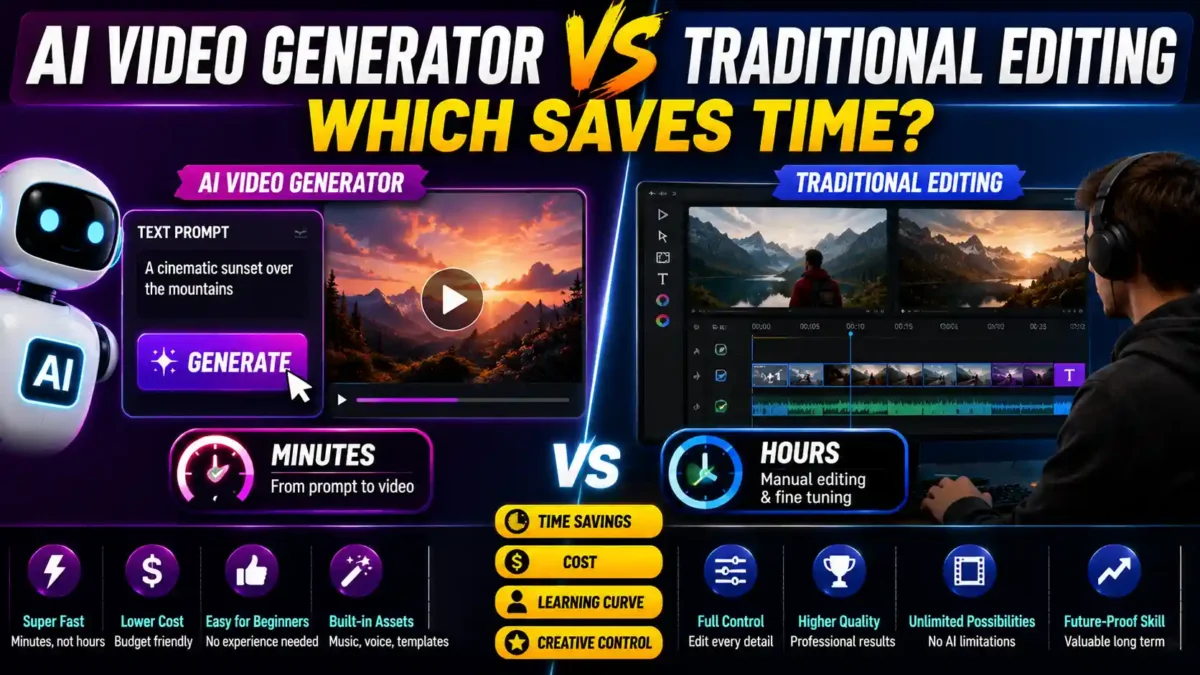

You want a video made, and you’re staring at two very different paths to get there. One promises a finished clip in minutes from a text prompt. The other hands you a full timeline, real cutting tools, and a learning curve that used to scare people away from video entirely. AI video generator vs traditional editing isn’t really a question of which one is better. It’s a question of which one saves more of your specific time, on your specific project.
For most beginners, an AI video generator saves more time on simple, short-form content, while traditional editing still saves time in the long run on projects that need real creative control. This comparison walks through the actual time trade-offs across the criteria that matter most when you’re just getting started, not just the marketing pitch each side makes for itself. It includes real examples, cost breakdowns, and a step-by-step guide to picking the right approach for your first project.
What “AI Video Generator” and “Traditional Editing” Actually Mean Here
An AI video generator, in the modern sense, takes a text prompt, a script, or a set of images and turns it into a finished or near-finished video with minimal manual work. Tools like Runway, Sora, and HeyGen fall into this category, and most now include a lighter editing layer on top so you can still tweak scenes, swap music, or adjust pacing once the AI has done the heavy lifting.
Traditional editing means software like Adobe Premiere Pro or DaVinci Resolve, where you import your own footage, cut it clip by clip, and control timing, transitions, color, and audio by hand. It’s the approach that’s powered video production for decades, and it still gives the most granular control of the two, at the cost of a real learning curve.
Worth noting before comparing them head-to-head: the line between these two categories is blurring fast. Most professional editing software now includes AI-assisted features like auto-captioning, silence removal, and highlight detection, and most AI generators now include manual override tools. The comparison below still holds for beginners deciding where to start, but neither side is a pure, isolated approach anymore.
How Much Time Does Each Approach Actually Save?
This is the core of the question, and the honest answer depends heavily on project complexity. For basic, straightforward projects, AI-driven tools can cut editing time by roughly 40 to 70 percent compared to manual editing, according to industry testing on common short-form use cases. That’s a real, substantial saving, and it’s the main reason AI tools have become the default starting point for beginners making social clips, product teasers, or talking-head explainer videos.
READ MORE
The gap narrows considerably on complex projects. The same testing found only a 20 to 30 percent time saving on more involved edits, since human judgment is still needed for quality control and creative decisions that AI tools don’t reliably get right on the first pass. A prompt-generated rough cut for a multi-scene narrative video still needs real editing time to fix pacing, continuity, and tone, which eats into the initial speed advantage.
There’s also a second layer of time cost that’s easy to miss when comparing these two on speed alone: the time it takes to get a usable result, not just a fast one. An AI generator can produce a full video in minutes, but if the output needs three or four regenerations to get right, that adds up. Traditional editing takes longer per project from the start, but the time is more predictable once you know the software, since you’re not depending on the tool interpreting your intent correctly.
Real-world example: A freelance social media manager needs a 30-second product teaser for a client. Using an AI video generator, she prompts the scene, generates three versions, picks the best, adds music from the built-in library, and exports. Total time: 25 minutes. Using traditional editing, she would need to source footage, cut it to match the script, add transitions, and color grade. Total time: roughly 2 hours. For this project, AI saved her 75% of the time.
Real-world example: The same freelance manager is now working on a 5-minute brand story with interviews, B-roll, and a specific emotional arc. Using an AI generator, she struggles to get consistent characters across scenes. She regenerates multiple times, but the tone shifts between clips. Total time: 4 hours with mediocre results. Using traditional editing, she imports interview footage, selects B-roll that matches the story, and controls the pacing shot by shot. Total time: 6 hours with excellent results. For this project, traditional editing was slower but produced a usable result.
Which One Has an Easier Learning Curve for Beginners?
AI video generators clearly win here, and it’s not close. Most current tools are built around natural language editing, meaning you type an instruction like “make the lighting warmer” or “cut the pacing in half” rather than learning where that function lives in a timeline-based interface. The core skill has shifted from clicking and dragging clips to writing a clear prompt, which is a much shorter learning curve for someone who has never opened editing software before.
Traditional editing software has a real onboarding cost. Understanding tracks, keyframes, transitions, and export settings takes practice, and mistakes early on can eat hours. That said, the skills transfer directly to more advanced work later, while prompt-writing skill for one AI tool doesn’t always transfer cleanly to a different generator with its own quirks and limitations.
Cost Comparison for Beginners
Traditional professional editing software carries a meaningfully higher price tag. A full Adobe Creative Cloud subscription runs around $79 a month, which is a steep starting cost for someone who isn’t sure yet whether video editing is something they’ll stick with. AI-focused alternatives tend to start much lower, with popular options beginning around $19 a month, and some offer usable free tiers for casual, low-volume use.
Hardware costs matter here too, and they favor AI tools even more clearly. Traditional editing, especially at higher resolutions, still benefits from a capable computer with a dedicated graphics card, since rendering and playback both get demanding fast. AI generators increasingly run their processing on cloud servers, so a beginner can get usable results from a modest laptop or even a phone, without investing in editing-capable hardware first.
| Cost Factor | AI Video Generator | Traditional Editing |
|---|---|---|
| Monthly subscription | $0–$30 | $20–$79+ |
| Hardware requirement | Basic laptop or phone | Capable PC with GPU |
| Learning curve | Low (prompt-based) | Moderate to high |
| Time to first usable video | Minutes to hours | Days to weeks |
| Ideal for | Short-form, social, teasers | Narrative, brand, high-control projects |
Audio, Voiceovers, and Revisions
Audio is one of the more underrated time factors for beginners, and it splits fairly evenly between the two approaches. AI video generators typically include built-in voiceover generation and stock music libraries directly in the same platform, so you’re not hunting down licensed tracks or recording narration separately. That saves real time on a beginner’s first few projects, since sourcing usable audio has always been one of the slower, more frustrating parts of getting started with video.
READ MORE
Traditional editing gives you more control over how that audio actually sits in the final video — layering, ducking background music under dialogue, fine-tuning levels scene by scene — which AI tools still handle more generically. For a beginner making a quick clip, the AI approach’s built-in audio tools are usually good enough. For anything where sound design matters to the final feel, the manual control traditional software offers still produces a more polished result.
Revisions are where the two approaches diverge most in practice. Traditional editing revisions are additive: you nudge a cut, adjust a level, and move on, without disturbing the rest of the timeline. Revising an AI-generated video often means regenerating a scene or the whole clip with a modified prompt, which can occasionally change other elements you didn’t intend to touch. Beginners doing a lot of iteration on a single project sometimes find this more frustrating than expected, even though the initial generation felt fast.
Real-world example: A content creator finishes a 60-second AI-generated promo. The client asks to change one line of dialogue. With a traditional edit, that’s a 2-minute fix: re-record the line, drop it in, re-export. With an AI-generated video, changing that line means regenerating the entire scene, which may alter the character’s appearance, the lighting, or the pacing of adjacent shots. The revision takes 30 minutes instead of 2.
Creative Control and Output Quality
This is where traditional editing still has a real, defensible edge. With manual editing, you control every cut, every transition, every second of timing, which matters enormously for projects where the details carry the message, like a narrative short film, a wedding video, or a brand piece that needs a specific tone throughout. AI tools have improved dramatically on visual quality, with some recent testing suggesting the visible gap between AI-generated footage and traditional cinematography has narrowed sharply, but visual fidelity and creative control aren’t the same thing.
AI generators tend to work from templates, styles, and automated settings, which is exactly what makes them fast, but also what limits precise control. You’re often nudging the result rather than building it stroke by stroke. For high-volume, low-stakes content, like social media clips or quick promotional teasers, that trade-off barely matters. For anything where a specific creative vision needs to survive intact from idea to final export, traditional editing remains the more reliable path, even if it’s slower to get there.
Speed and control tend to move in opposite directions here. AI tools save the most time exactly where creative control matters least, and traditional editing costs the most time exactly where that control matters most.
What Actually Fits a Beginner’s First Project
If your first project is a short social clip, a product demo, or something with a tight deadline and low creative stakes, an AI video generator is very likely the faster path, both in raw editing time and in how quickly you’ll feel capable of producing something usable. The lower cost and near-nonexistent learning curve make it a low-risk way to start making video content at all, which matters more than people expect when the alternative is not making anything.
READ MORE
If your first project is something you actually care about getting exactly right — a personal film, a portfolio piece, or content tied closely to a specific creative voice — traditional editing is worth the slower start. The time spent learning the software isn’t wasted time. It’s a skill that compounds on every future project, in a way that prompt-writing for a specific AI tool doesn’t always carry over.
A hybrid approach is increasingly common and worth considering seriously rather than treating this as an either-or decision. Generating a rough cut, a script-to-scene draft, or raw footage with AI, then refining pacing, color, and audio in a traditional editor afterward, combines the speed of one approach with the control of the other. Several current tools are built specifically around this workflow, letting you drop AI-generated clips straight into a manual timeline for final polish.
A Step-by-Step Guide to Picking Your First Approach
If you’re still unsure which path to take, follow this decision process.
Step 1: Define the project’s creative stakes
Ask yourself: “If this video isn’t perfect, does it matter?” If the answer is no — a quick social clip, a test video, a rough draft — AI is likely the faster path. If the answer is yes — a client deliverable, a portfolio piece, a brand asset — traditional editing gives you more control.
Step 2: Check your deadline
If you have less than a day to produce something usable, AI is almost always the better choice. If you have a week or more, the slower but more controllable traditional approach becomes viable.
Step 3: Consider your long-term goals
If you plan to make video a regular part of your work, learning traditional editing early pays off. If video is a one-off task, AI gets you to a finished product faster without a long-term investment.
Step 4: Test both with a small project
Make the same 30-second video twice: once with AI, once with traditional editing. Compare the time, the result, and how you felt during the process. That hands-on experience will tell you more than any comparison chart.
Step 5: Choose a hybrid workflow if both have value
Use AI for the initial generation and rough cuts, then bring the clips into a traditional editor for pacing, color, and audio polish. This combines the best of both and is the workflow most experienced creators settle on.
Common Mistakes Beginners Make When Choosing
READ MORE
- Assuming AI is always faster. It’s faster for simple projects, but on complex, multi-scene videos, the regeneration cycle can eat more time than a traditional edit would have.
- Assuming traditional editing is always better. For a quick social clip, the time spent learning Premiere Pro or DaVinci Resolve is often not worth the marginal quality gain.
- Not testing either approach before committing. Both tools have free tiers or trials. Use them before you pay for anything.
- Ignoring audio until the end. Audio is half the video experience. Plan for it early in either workflow.
- Skipping the hybrid option. Many creators assume they have to pick one. The hybrid workflow is often the most efficient path.
Frequently Asked Questions
Is an AI video generator good enough for YouTube or TikTok content?
For short-form content on those platforms, yes, in most cases. AI generators are specifically tuned for fast turnaround on exactly this kind of content, and audiences on those platforms generally prioritize message and pacing over frame-by-frame cinematographic precision.
Do I need to learn traditional editing at all if I start with AI tools?
Not immediately, but it helps as your ambitions grow. Many creators start entirely with AI tools and pick up basic traditional editing later specifically to refine AI-generated output, rather than learning it from scratch as a separate skill.
Which option is cheaper for someone just starting out?
AI-focused tools are generally cheaper to start with, both in subscription cost and hardware requirements. Traditional professional software costs more upfront and often benefits from a more capable computer, which adds to the real starting cost for a beginner.
Can I use both approaches on the same project?
Yes, and it’s becoming one of the more common workflows. Many current tools support exporting AI-generated clips directly into traditional editing software for final adjustments, which lets beginners get the speed benefit up front without giving up manual control entirely.
Does AI video quality actually look as good as traditionally shot and edited footage?
It’s gotten close on visual fidelity for many use cases, closer than most beginners expect. Where it still tends to fall short is consistency across longer, multi-scene projects, which is where traditional editing’s manual control still matters more.
How long does it take to learn traditional editing software?
Most beginners can produce a basic video in a few hours. Reaching a comfortable, efficient level usually takes 10–20 hours of practice. Mastering advanced techniques can take months, but you don’t need mastery for most beginner projects.
What is the best AI video generator for beginners?
Runway, Pika, and HeyGen are all beginner-friendly. Each has a free tier or trial. The best one depends on your specific use case — Runway for cinematic clips, Pika for stylized content, HeyGen for talking-head videos and avatars.
Can I make money with AI-generated videos?
Yes. Many creators use AI video generators for social media content, product teasers, and client work. The same principles apply as with traditional video: the value is in the idea and the editing judgment, not just the tool.
Conclusion
AI video generator vs traditional editing isn’t a contest with one winner for every beginner. AI tools save the most time on simple, short-form projects with a low cost and almost no learning curve, while traditional editing costs more time upfront but pays that back with real creative control on projects where precision matters.
The right starting point depends less on which tool is objectively better and more on what you’re actually trying to make. Start with the approach that matches your first project, and don’t be surprised if you end up using both before long. The most efficient creators are the ones who use AI for speed and traditional editing for precision, switching between them depending on what each project needs.


Leave a Reply