
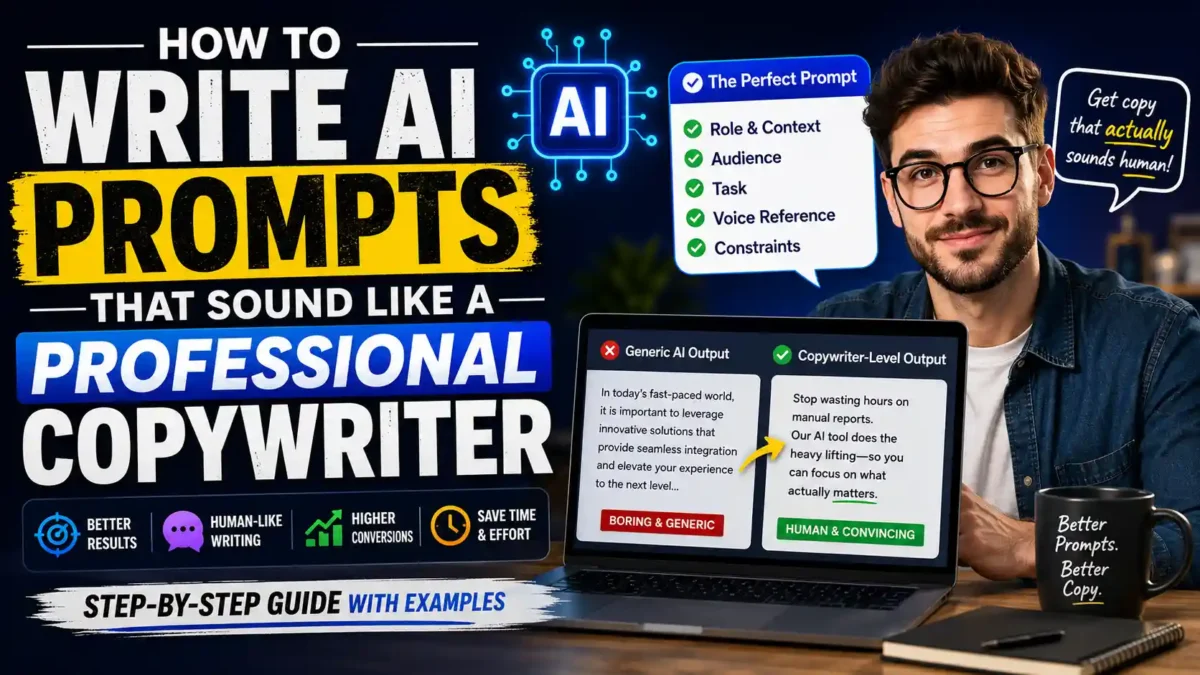

If you’ve ever asked ChatGPT or Claude to “write a Facebook post” and gotten back something that starts with “In today’s fast-paced world,” you already know the problem. That’s not copywriting. That’s corporate wallpaper. The good news is that the issue isn’t the AI model — it’s the prompt. Learning how to write AI prompts that actually produce professional-grade copy is quickly becoming one of the highest-leverage skills in marketing. This guide walks you through exactly how to do it, step by step, with real examples, a reusable template, and a 30-day plan to build the skill.
Why Most AI Prompts Produce Generic Writing
AI models like ChatGPT were trained on a massive corpus of neutral, professional prose. Their default register is competent, hedged, and institutional — the voice of an average LinkedIn post or corporate announcement. The model produces the average because the average is the safest prediction. When you write a prompt like “write a product description,” you’re asking the model to predict the most statistically likely sequence of words. That’s why you get “elevate your experience” and “seamless integration” — those are the words that appear most frequently in the training data.
Vague prompts produce vague results. According to research, structured prompts can improve accuracy by 40 to 70 percent for copywriting and related tasks. But here’s what most guides don’t tell you: the difference between generic AI output and genuinely useful copy isn’t about length or complexity. It’s about specificity. A short, highly specific prompt will outperform a long, vague one every time.
To make this concrete, compare these two prompts:
| Weak Prompt | Strong Prompt | What Changed |
|---|---|---|
| “Write a product description for a laptop.” | “Act as a copywriter for a premium electronics brand. Write a 120-word product description for a lightweight laptop aimed at remote workers who travel frequently. Emphasize battery life and portability. Use a confident, understated tone. Avoid words like ‘revolutionary’ or ‘game-changing.’” | Added role, audience, length, focus, tone, and banned words. |
| “Write an email to a client.” | “Act as an account manager at a digital agency. Write a 150-word email to a client who missed their monthly reporting call. Tone should be warm but professional. Include one specific question about their Q3 goals. End with a clear next step.” | Added context, relationship, purpose, and structure. |
| “Write a blog intro about AI.” | “Act as a tech blogger for small business owners. Write a 100-word introduction for an article about using AI for customer support. Open with a relatable problem, not a definition. Avoid jargon. End with a sentence that makes the reader want to keep reading.” | Added audience, format, opening strategy, and constraint. |
The strong prompts aren’t dramatically longer. They’re just more specific. Every word is doing work.
How to Write AI Prompts: The Five Core Elements
Every professional prompt benefits from the same five-part structure. Fill in each piece with as much detail as you can.
READ MORE
1. Role and Context
Never ask an AI to write blindly. Establish a specific professional identity first. Instead of “write a sales email,” try “act as a B2B SaaS copywriter with eight years of experience writing for CTOs and IT directors.” The more specific the role, the more targeted the output. Research shows that role-based prompting can qualitatively improve the relevance of AI outputs.
Why this works: When you assign a role, you narrow the model’s search space. Instead of pulling from every possible writing style, it pulls from the patterns associated with that specific role. A “B2B SaaS copywriter writing for CTOs” produces different language than a “friendly lifestyle blogger.” Same model, different output.
2. Audience Definition
Who’s reading this? What do they already know? What do they need? A prompt that includes audience details forces the model to write for a specific person rather than a generic “reader.” For example: “Your audience is marketing managers at mid-sized ecommerce brands. They know what A/B testing is but don’t have time to run complex experiments. They need actionable tactics, not theory.”
Real-world example: A SaaS company writes two versions of a landing page. The first targets “business owners.” The second targets “operations managers at 50–200 person logistics companies who currently track shipments in spreadsheets.” The second version converts 3x better — not because the copy is better written, but because it speaks directly to a specific person with a specific problem.
3. The Specific Task
State clearly what you want the AI to produce. “Write a 300-word email” is fine. “Write a 300-word email that moves a lukewarm prospect to book a 15-minute sales call” is better. Include the format, length, and any structural requirements.
Be explicit about structure when it matters: If you want a hook, three body paragraphs, and a call to action, say so. If you want short paragraphs, say so. If you don’t want bullet points, say so. Models default to whatever structure is most common in their training data, which is usually bullet points and headers. If you want something different, ask.
4. Voice Reference (Show, Don’t Describe)
This is the single most effective technique for getting human-sounding output. Instead of describing the tone you want — “make it casual and punchy” — show the AI an example. Paste 2 to 3 pieces of copy you actually like and instruct the AI to “analyze and mimic the exact tone, paragraph rhythm, and sentence structure of these examples.” AI tools are pattern matchers. Give them a pattern to match.
One thing most coverage misses is that you don’t need to be a professional writer to do this well. If you have three emails that got positive replies, or three social posts that performed well, you have everything you need to train an AI on your voice. The model doesn’t care if the examples came from a Pulitzer winner or a product manager — it just needs a consistent pattern to copy.
How to use this in practice: Before you write your prompt, open a document and paste in two or three pieces of writing that match the tone you want. Then write: “Analyze the tone, sentence length, and rhythm of the following examples. Then write [your task] in that same style.” This single technique will improve your output more than any other adjustment.
5. Constraints and Banned Words
To eliminate the robotic vibe, proactively ban AI buzzwords. Add a clear instruction: “Do not use these words: leverage, seamless, robust, elevate, game-changer, cutting-edge, delve, transformative, or any variation of ‘in today’s world.’” This isn’t optional. AI models default to a specific vocabulary set, and if you don’t tell them to avoid it, they’ll use it.
A starter banned-word list:
- Leverage, seamless, robust, elevate
- Game-changer, cutting-edge, revolutionary
- Delve, transformative, unprecedented
- In today’s world, in today’s fast-paced landscape
- It is important to note, it’s worth mentioning
- Unlock, unleash, empower
- Synergy, holistic, paradigm
- Dive into, navigate the complexities of
You’ll develop your own list over time. Whenever you see a word in AI output that makes you cringe, add it to your banned list.
A Complete Prompt Template You Can Use Today
Here’s a fill-in-the-blank template that incorporates everything above. Copy this, replace the bracketed sections, and paste it into your AI tool of choice.
“Act as a [senior copywriter / marketing director / specific role] with [X] years of experience writing for [industry or audience type].
Your task: Write a [format: email / landing page / social post / blog introduction] about [topic]. Length: [word count].
Audience: [describe who’s reading, what they already know, what they need]. After reading this, they should be able to [concrete outcome].
Voice reference: Analyze and match the tone, sentence rhythm, and vocabulary of these examples: [paste 2-3 examples of writing you like].
Constraints: Use active voice. Write in short paragraphs. Do not use these words: [list of banned words]. Do not use em dashes. Avoid bullet points unless specifically requested. Avoid filler phrases like ‘it is important to note’ or ‘in today’s competitive landscape.’”
This template works because it gives the AI everything it needs and nothing it doesn’t. It’s specific without being overcomplicated. According to a 2025 analysis from the UK government’s AI guidance, prompts with this level of structure produce “clear, compelling content that meets your audience’s needs.”
How Long Should a Good AI Prompt Be?
The short answer is: longer than you think. A weak prompt like “write a business memo about consolidating our vendors” is about 10 words. A strong version of the same prompt runs closer to 130 words and produces output that’s usable with minor edits. But here’s the nuance — it’s not about word count for its own sake. Every additional word should add specificity. If you’re adding filler, you’re making the prompt worse.
READ MORE
What stood out during research was how consistently the gap between weak and strong prompts came down to the same missing elements: a defined audience, concrete examples, and explicit constraints. Most people skip at least two of these three. The fix doesn’t require advanced prompt engineering skills — it just requires slowing down and thinking through what you actually need before you start typing.
Common Mistakes That Kill AI Copy (And How to Fix Them)
Even with a solid template, there are a few pitfalls that consistently produce bad output.
Mistake 1: Treating the First Draft as Final
The most common mistake is prompting once and expecting perfection. Good AI-assisted copy usually takes two or three passes: one for structure, one for tone, and one for trimming anything that still sounds corporate. The first draft is a rough cut you’re directing, not a finished asset. Plan to iterate.
Fix: After the first output, ask the AI to “tighten this by 20% without losing any meaning.” Then ask it to “rewrite the opening line three different ways.” Then pick the best and edit manually.
Mistake 2: Overcomplicating the Prompt
Paradoxically, some people try to fix generic output by adding more and more instructions until the prompt becomes incoherent. Common mistakes include overcomplicating prompts while simultaneously providing insufficient context. Focus on the five elements above and keep the structure clear.
Fix: If your prompt is longer than 200 words, read it back. Are you repeating yourself? Are any instructions contradictory? Cut anything that isn’t doing work.
Mistake 3: Describing Tone Instead of Showing It
If you ask for “conversational” or “professional” or “punchy,” you’ll get what the model thinks those words mean — which is whatever appeared most often in its training data next to those words. That’s why everyone’s “conversational” AI copy sounds the same. The fix is simple: paste examples. Show the model what you actually mean.
Fix: Replace every tone adjective in your prompt with a real example. Instead of “make it conversational,” paste a paragraph that sounds the way you want and say “match this.”
Mistake 4: Not Banning AI’s Favorite Words
Certain formatting habits and word choices are dead giveaways that copy came straight from a model with no editing. Em dashes are a big one — AI models default to them constantly. So are bullet points in contexts where they don’t belong. Generic phrasing like “leverage,” “seamless,” “robust,” and “elevate” are also telltale signs. Add a banned-word list to every prompt.
Fix: Build a banned-word list in a text file. Paste it into every prompt. Update it whenever you see something new that makes AI copy obvious.
Mistake 5: Forgetting to Ask for Variations
Asking for one version means you get one option. Asking for three versions gives you choices and often reveals a stronger angle you hadn’t considered.
Fix: End every prompt with: “Give me three distinct versions with different openings.” Then pick the best and refine it.
The AI Sandwich: A Workflow That Actually Works
There’s a framework called the “AI Sandwich” that combines human creativity with AI efficiency. Here’s how it works:
READ MORE
- Start with a human-written brief. Before you open ChatGPT, write down what you actually need. Two sentences is enough.
- Turn the brief into a detailed prompt. Use the five-element template above.
- Let AI generate a first draft. Don’t expect it to be good. Expect it to be a starting point.
- Edit heavily. Rewrite the opening. Cut the clichés. Add specifics only you know. Adjust the tone.
- Run a second AI pass for polish. Ask the AI to “tighten the language without changing the meaning” or “suggest three alternative headlines.”
- Final human edit. Read it out loud. If anything sounds unnatural, rewrite it. The final version should sound like you, not like a model.
A practical workflow, based on advice from AI practitioners, looks like this: start with a role, ask the AI to help write the brief by generating clarifying questions, plan before drafting, anchor with examples, and finish with a human edit for tone and accuracy. One copywriter recently reported creating new website copy using 95 percent AI assistance that scored zero percent on AI-detection tools. That’s the ceiling for what’s possible when you get the prompting right.
Tool-Specific Considerations
Different AI models respond differently to the same prompts. ChatGPT tends to be the most reliable for copywriting out of the box. Claude can get you just as far, but it usually takes a bit more back and forth to land the same tone. Claude also lets you set permanent system preferences — for example, you can tell it once to never use em dashes and it will remember that across every future output.
Gemini is strong for research-backed content and integrates well with Google Docs if that’s where you work. It tends to produce slightly more formal output by default, so you may need to push harder on tone.
| Tool | Strength for Copywriting | Watch Out For | Best For |
|---|---|---|---|
| ChatGPT | Reliable first drafts, strong structure | Defaults to corporate vocabulary | Blog posts, emails, landing pages |
| Claude | Natural tone, remembers preferences | Needs more back-and-forth for the first draft | Long-form content, brand voice work |
| Gemini | Research integration, up-to-date info | More formal default tone | Content that needs current facts |
Regardless of which tool you use, the fundamentals don’t change. The model is the same. The difference is in what you give it to work with.
A 30-Day Plan to Master AI Prompt Writing
READ MORE
Week 1: Learn the Five Elements
- Write five prompts using the five-element template. Don’t worry about quality yet.
- For each prompt, generate output and note which elements made the biggest difference.
- Start a banned-word list in a text file. Add words as you see them.
Week 2: Practice Voice Matching
- Find three pieces of writing you admire. Paste them into an AI and ask it to match the style.
- Try the same task with and without voice examples. Compare the results.
- Write one piece of content entirely from a prompt and edit it to a publishable standard.
Week 3: Iterate and Refine
- Take one prompt and run it five times with small changes. Note what improves and what doesn’t.
- Ask for three variations of every output. Pick the best and refine it.
- Experiment with different AI tools using the same prompt. Note the differences.
Week 4: Build Your System
- Create a personal prompt template file with your preferred structure and banned words.
- Write one piece of content per day using your template and editing workflow.
- Compare your day-1 output to your day-28 output. The improvement will be significant.
Frequently Asked Questions
Can I use the same prompt for different AI tools?
Yes, with minor adjustments. The five-element structure (role, audience, task, voice reference, constraints) works across ChatGPT, Claude, Gemini, and most other major models. You may need to tweak the formatting slightly, but the principles are model-agnostic.
How do I get AI to stop sounding like a marketing brochure?
Add a constraint that says “write this like a colleague emailing a colleague — no corporate voice.” Then ban the specific words that make it sound like a brochure: leverage, seamless, robust, elevate, and so on. And always feed it examples of the kind of writing you actually want.
What if I don’t have examples of my own writing to show the AI?
You can use examples from writers you admire, or from competitors whose tone you want to emulate. The AI doesn’t know the difference — it just needs a pattern to follow. Just make sure the examples are consistent with each other so the model isn’t trying to reconcile conflicting styles.
Is prompt engineering actually a real skill or just a trend?
Prompt engineering is increasingly recognized as a legitimate professional skill. Marketing agencies, SaaS companies, and ecommerce brands are actively hiring for prompt engineering roles. For writers, it’s one of the most natural career transitions available. The skill isn’t technical — it’s about thinking clearly before you type.
How many words should a good prompt be?
There’s no fixed number, but most strong prompts for copywriting land between 80 and 200 words. The important thing is that every word adds specificity. A 50-word prompt that covers all five elements will outperform a 300-word prompt that repeats itself.
Should I include examples in every prompt?
Not always, but it helps more often than not. For short, simple tasks, you can skip examples. For anything longer than a paragraph or anything where tone matters, including two or three examples will dramatically improve the output.
How do I stop AI from using em dashes?
Add “do not use em dashes” to your constraints. In Claude, you can set this as a permanent preference. In ChatGPT, you’ll need to include it in each prompt. Some people also add “use commas or parentheses instead.”
Can I make money writing AI prompts for others?
Yes. Many agencies and small businesses hire prompt writers to build reusable templates for their teams. It’s a growing niche in the freelance market, and it doesn’t require a technical background — just strong writing instincts and a clear understanding of the five-element structure.
Conclusion
Learning how to write AI prompts that sound like a professional copywriter isn’t about memorizing a magic formula. It’s about giving the model enough specificity to step away from its default, generic voice. The difference between a weak prompt and a strong one comes down to five elements: role, audience, task, voice reference, and constraints. Show the AI what you want instead of describing it. Ban the words you don’t want to see. Plan to iterate — good copy usually takes a few passes. And always, always edit the final draft yourself.
The AI can get you 90 percent of the way there. The last 10 percent — the part that actually sounds like a professional wrote it — that’s still on you. And that’s exactly why this skill is valuable. Anyone can type a prompt. Very few people know how to direct one.



Leave a Reply