
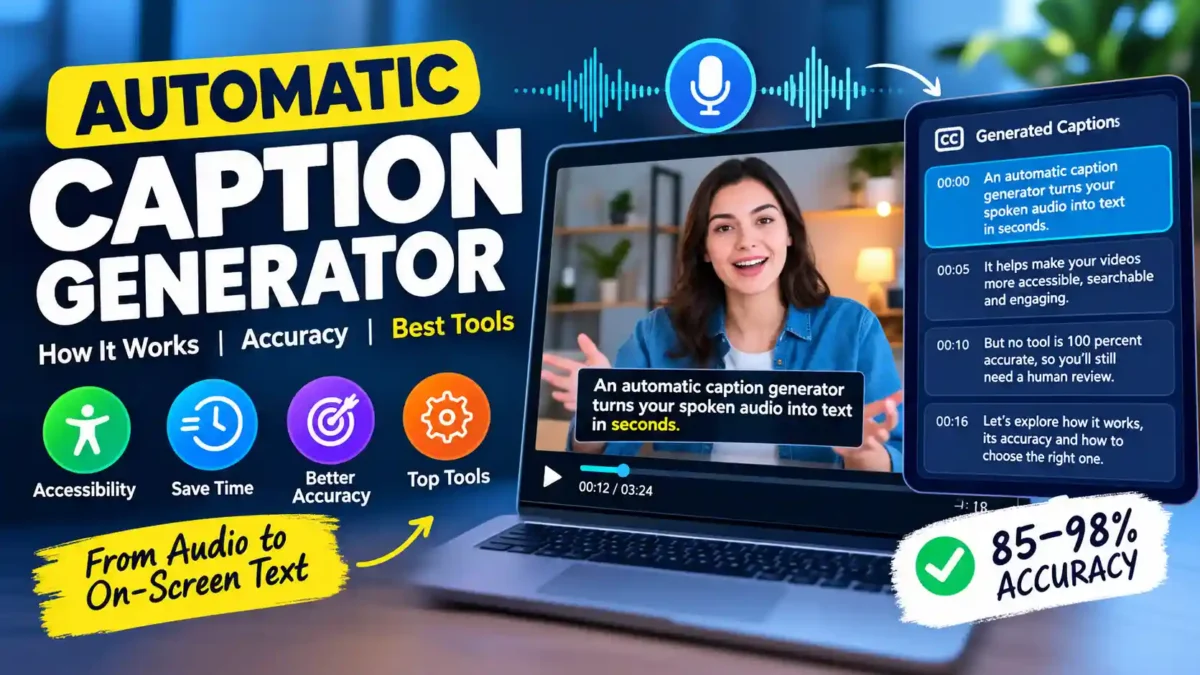

An automatic caption generator turns spoken audio into timed on-screen text in seconds, but the tool you pick affects everything from accessibility compliance to how much editing you end up doing afterward. This guide walks through how the technology works, what actually drives accuracy up or down, and how to pick the right one for your workflow instead of trusting a demo reel.
Short answer first: no automatic caption generator hits 100 percent accuracy on real-world audio. Most land somewhere between 85 and 98 percent depending on audio quality, accent, and vocabulary, which means every automatic caption still needs a human pass before it goes out publicly. The goal is not to eliminate editing, but to reduce it from hours to minutes.
What Is an Automatic Caption Generator?
An automatic caption generator is software that listens to a video’s audio track, converts the speech to text using automatic speech recognition (ASR), and then times that text to appear on screen in sync with the narration. It’s the same underlying technology YouTube has used since it introduced automatic captions in November 2009, which turned captioning from a manual accessibility task into something that happens by default on most upload platforms.
A caption generator doesn’t just transcribe. It also has to decide where a sentence breaks into readable lines, how long each line should stay on screen, and in many cases who’s speaking. That’s a different job than a plain transcript, which is just a continuous block of text with no timing or line breaks attached.
To understand the difference, think of a transcript as a script and a caption file as the script plus stage directions for timing. A transcript is useful for reading, searching, and repurposing content. A caption file is specifically designed for the constraints of a video player: short lines, precise timing, and speaker labels when needed.
How Does an Automatic Caption Generator Actually Work?
Underneath, an automatic caption generator runs the audio through a few distinct processing stages rather than one single step. Understanding these stages helps you diagnose why a tool might fail on your specific content.
READ MORE
The first stage is speech recognition itself: the system predicts words from the audio signal. This is where clear audio helps the most. Background music, room echo, and two people talking at once all make the prediction harder, which is why the same tool can look flawless on one video and sloppy on the next. Modern ASR systems use deep learning models trained on thousands of hours of speech, but they still struggle when the signal-to-noise ratio drops.
After that comes punctuation restoration and segmentation, where the raw word stream gets commas, capitalization, and sensible line breaks. This step is often overlooked, but it’s the difference between a readable caption and a wall of text. A good tool will use language models to predict where sentences end, even when the speaker doesn’t pause.
Then, for videos with more than one speaker, a diarization step tries to label who’s talking. This is technically challenging because it requires the system to distinguish voices based on pitch, tone, and speaking style. Tools that do this well are valuable for interviews, podcasts, and panel discussions.
Finally, timestamp alignment locks each caption line to the moment it’s actually spoken, which is what makes the caption file editable without breaking sync. If you’ve ever edited a caption and watched it drift out of sync, you’ve experienced a failure at this stage.
How Accurate Is an Automatic Caption Generator, Really?
Accuracy varies more than most marketing pages suggest, and it depends heavily on the source audio rather than being a fixed property of the tool.
A 2026 accuracy study that manually checked YouTube auto captions against a human ground truth of roughly 997,000 words across 264 English videos found a median word error rate of 9.9 percent and a mean of 14.8 percent, meaning half of all tested videos landed under 10 percent error while a smaller share dragged the average up significantly. Separately, a team that hand-checked 50 YouTube videos found automatic captions ranging from 85 to 95 percent accurate overall, with technical jargon mis-transcribed in 67 percent of occurrences and proper names transcribed incorrectly close to half the time. That same testing found background music above 25 percent volume caused accuracy to drop by 15 to 20 percent.
Dedicated caption tools tend to perform better on clean audio. One 2026 industry comparison found AI transcription tools reaching 92 to 98 percent accuracy at around a dollar per video, against $1.50 or more per minute for fully human transcription. Another head-to-head test of consumer subtitle apps put Kapwing and VEED.io both around 85 to 90 percent accuracy on real footage, not the studio-clean samples most vendors demo with.
None of this means automatic captions are unreliable. It means they’re a strong first draft, not a finished, publish-ready asset, especially for anything customer-facing or accessibility-sensitive. The practical takeaway is to budget time for a review pass and to focus your editing energy on the words most likely to be wrong.
The Real-World Errors Nobody Talks About
Vendor accuracy numbers rarely capture the specific kind of mistake that actually annoys viewers. A widely shared breakdown of one YouTube video’s auto captions documented the pattern clearly: brand names and niche terms get mangled in ways a generic accuracy percentage never shows. A search engine name came out as two garbled words, a shopping app’s name was transcribed as an unrelated word, and a European city name was split into nonsense syllables, all in a video where the rest of the sentence transcribed correctly.
READ MORE
That’s the friction point worth planning around. An automatic caption generator is usually strongest on common vocabulary and weakest on exactly the words that matter most to your brand: product names, acronyms, and proper nouns. A reviewer who only skims for grammar will miss these, since the surrounding sentence still reads fine.
In my view, the accuracy percentage on a vendor’s landing page is close to useless for decision-making. It’s measured on curated demo audio, not your actual narration with your actual product vocabulary. The number that matters is how many corrections your specific recording needs, and the only way to know that is to run one real clip through the tool before committing to it.
How to Choose the Right Automatic Caption Generator
Step 1: Test It on Your Own Audio, Not a Demo Clip
Pick a 60 to 90 second clip from content you’d actually publish, ideally one with a couple of product names or technical terms in it. Run that exact clip through two or three candidate tools and count the corrections each one needs. This single step tells you more than any accuracy claim on a pricing page. Make a note of which errors are consistent across tools and which are unique to each one.
Step 2: Check What Accessibility Standard You Actually Need
If the video is customer-facing or used in training, find out whether you need to meet ADA, Section 508, or a regional standard like the European Accessibility Act, which became binding in June 2025. Raw automatic captions are not considered a compliant accessible deliverable on their own in most of these frameworks. They’re a starting point for a human-reviewed caption file. Consult the official guidelines for your region to understand the specific requirements for accuracy and formatting.
Step 3: Compare the Correction Workflow, Not Just the Output
Some tools let you edit captions as plain text and have the timing adjust automatically. Others force you to click into a timeline and nudge individual blocks. The first approach is dramatically faster once you’re fixing more than a handful of lines, so test the editing experience with the same clip from Step 1, not just the raw transcript quality. A tool that produces slightly better raw output but has a clunky editor can cost you more time overall.
Step 4: Check Language and Translation Support
If you publish to more than one market, confirm the tool can translate captions and keep timing intact, rather than requiring you to export, translate elsewhere, and reimport. Round-tripping between separate tools is a common source of captions drifting out of sync after translation. Look for tools that offer integrated translation with a preview of the timed output.
Step 5: Decide Where Captions Fit in Your Bigger Workflow
A single screen recording or narrated demo can produce more than just a caption track. The same source audio can become a searchable transcript, a help-center article, or training documentation, so it’s worth choosing a caption generator that fits into that broader publishing process instead of treating captioning as an isolated, one-off task. Our own free YouTube transcript generator is a useful way to see the difference between a raw transcript and a timed caption file before you commit to a paid tool.
A Quick Comparison: Two Popular Options
Kapwing and Descript sit at opposite ends of the same category, which makes them a useful reference point even if neither ends up being your final pick.
READ MORE
| Tool | Starting Price | Best For | Trade-off |
|---|---|---|---|
| Kapwing | From $16/month | Fast, browser-based captioning for short-form social clips | Lighter feature set for long-form or podcast-style editing |
| Descript | From $24/month | Transcript-based editing for podcasts and interview-style video | Steeper learning curve, less suited to quick social turnarounds |
Do You Still Need to Edit Automatic Captions Before Publishing?
Yes, in almost every case where the video is public or used for training. Even the best-performing tools in current testing land short of the near-perfect accuracy that formal accessibility standards expect, and the errors that slip through tend to cluster around names, acronyms, and technical terms rather than being spread evenly across the transcript. A quick read-through, focused specifically on proper nouns and product vocabulary, catches most of what an automatic caption generator gets wrong.
This is also where the wider workflow pays off. Teams building a faceless YouTube channel with free AI tools often lean on the same editor’s built-in auto-captions for speed, then run one review pass before publishing rather than trusting the first output. That same discipline applies whether you’re using a free tool bundled into your editor or a dedicated free AI tool built specifically for captioning.
Common Mistakes When Using Automatic Caption Generators
READ MORE
- Trusting the first output without editing. Fix: always run a review pass focused on proper nouns and technical terms.
- Using a tool with a clunky editor. Fix: test the editing workflow, not just the raw accuracy, before committing.
- Ignoring accessibility standards. Fix: check whether you need ADA, Section 508, or European Accessibility Act compliance and plan accordingly.
- Assuming the tool handles multiple languages well. Fix: test translation quality separately; machine translation is less reliable than same-language transcription.
- Not keeping the source transcript. Fix: export and save the raw transcript; it’s useful for SEO, repurposing, and future edits.
- Forgetting to upload the corrected caption file. Fix: make sure you replace the auto-generated captions with your edited version on the platform.
A Step-by-Step Workflow for Captioning with AI
If you want a repeatable process, follow these steps.
- Record clean audio. Use a decent microphone, minimize background noise, and avoid music under speech.
- Generate the first draft. Run the audio through your chosen automatic caption generator.
- Export the transcript. Save it as a plain text file for reference and repurposing.
- Edit the captions. Focus on proper nouns, product names, acronyms, and technical terms. Read through once for flow.
- Check timing. Watch the video with captions on to ensure lines appear in sync and stay long enough to read.
- Upload the corrected file. Replace the auto-generated captions on the platform with your edited version.
- Archive the final caption file. Keep it for future re-uploads or edits.
Pricing and Value: What Should You Expect to Pay?
Automatic caption generators range from free (bundled with editors or platforms) to premium subscription tools. Here’s a breakdown of typical costs.
READ MORE
| Type | Typical Cost | Best For |
|---|---|---|
| Free built-in tools | $0 | YouTube uploads, basic social media clips |
| Freemium tools | $0–$16/month | Occasional use with watermarks or limits |
| Mid-tier subscriptions | $16–$30/month | Regular content creators, small teams |
| Enterprise or pay-per-use | $1–$5 per video or minute | Large volumes, specialized needs |
| Human transcription services | $1.50+ per minute | High-stakes, compliance-critical content |
The key is to match the cost to the value. If a video is for internal use, free auto-captions might be enough. If it’s a customer-facing training module, the cost of a paid tool or human review is worth it to avoid accessibility complaints and brand damage.
Frequently Asked Questions About Automatic Caption Generators
How accurate is an automatic caption generator on average?
Most tools land between 85 and 98 percent word accuracy on clear English audio, with accuracy dropping noticeably when there’s background music, multiple speakers, or heavy technical vocabulary.
Are automatic captions good enough for accessibility compliance on their own?
Generally no. Standards like the European Accessibility Act and Section 508 expect a reviewed, corrected caption file, not the raw automatic output, especially for customer-facing or training content.
What’s the difference between a transcript and a caption file?
A transcript is continuous text with no timing attached. A caption file is segmented into short, timed lines synced to the audio, which makes it usable inside a video player.
Can an automatic caption generator handle multiple languages?
Many can generate captions in the original language and offer machine translation into others, but translated captions still need a review pass, since automatic translation quality varies more than same-language transcription does.
Does uploading my own caption file override YouTube’s automatic captions?
Yes. Uploading a corrected SRT or VTT file replaces the displayed and indexed caption track, while YouTube’s automatic version stays in the background but is no longer what viewers see.
What file formats do caption generators produce?
Most produce SRT or VTT files, which are widely supported by video players and platforms. Some also export as plain text transcripts.
Can I use automatic captions for SEO?
Yes. Search engines index caption files, so well-edited captions can improve discoverability. The transcript can also be repurposed as a blog post or help article.
How long does it take to edit automatic captions?
For a 10-minute video with clear audio, expect 5–10 minutes of editing. For technical content with many proper nouns, it could take 15–20 minutes. The goal is to focus on the words most likely to be wrong.
An automatic caption generator earns its place in almost any video workflow because it turns a slow manual task into a fast first draft. What it doesn’t do is remove the need for a human pass, particularly around brand names, technical terms, and anything tied to accessibility compliance. Test candidates on your own audio, match the tool to how you’ll actually edit and reuse the output, and treat the accuracy number on any pricing page as a starting estimate rather than a guarantee.

Leave a Reply