
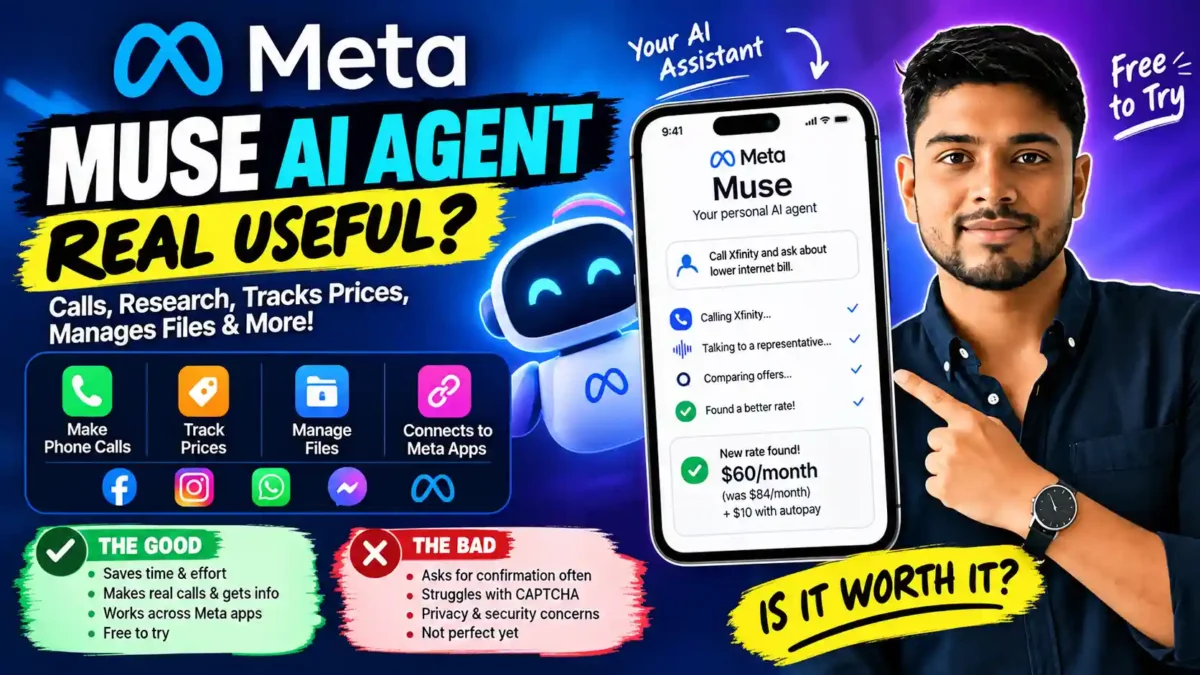

I installed Meta’s Meta Muse AI Agent the day it dropped, mostly out of curiosity. Two weeks later, I’ve used it to argue with my internet provider, track a graphics card I’ve been eyeing for months, and let it read a contract I was too lazy to open myself. Some of it worked. Some of it was a mess. Here’s what I actually found.
Before we go any further, a quick note: I’m not a Meta employee, and nobody paid me for this. I just think it’s worth writing down what works and what doesn’t when a company this big puts an AI agent in everyone’s pocket for free.
What Is the Meta Muse AI Agent, Exactly?
The Meta Muse AI Agent is not another chatbot. That’s the first thing to understand. When you talk to ChatGPT, you ask a question and get an answer back. That’s it. With this thing, you give it a job, walk away, and come back to find it done.
Meta’s own description calls it “a secure, private personal AI agent that proactively helps with people’s goals and suggests ideas.” The key word there is “proactively.” It doesn’t wait for you to spell out every step.
Here’s a simple way to see the difference. A normal chatbot works like this: you ask, AI answers. This tool tries to work like this: you give a goal, the AI researches, takes action, then comes back and tells you what it did.
That gap sounds small on paper. In practice, it’s everything. Whether it actually delivers is the whole question, and I’ll get into that below.
If you’re brand new to AI tools, our guide to the best AI tools for beginners is a better place to start before jumping into agents.
1. The Meta Muse AI Agent Can Call Businesses for You
Let me start with the feature I was most skeptical about, because it turned out to be the most useful.
READ MORE
The idea is simple enough. You tell the Meta Muse AI Agent who to call, pick a voice (male or female), and it does the rest. It handles the phone menu, waits on hold, and talks to a human on your behalf. I didn’t expect to be impressed. I was.
One tester I followed on YouTube used it to negotiate his Comcast bill. Muse called, went through the standard hold times, and eventually got a rep to offer a promo rate of $60 a month instead of $84. Another $10 came off if he turned on autopay. The whole call was transcribed afterward, so he could see exactly what was said.
What struck me was how normal the whole thing sounded. Muse introduced itself as “Haley, calling on Peter’s behalf,” explained it was taking notes, and just kept asking the same question in different ways until it got a straight answer. Anyone who has spent 45 minutes on hold knows how big a deal that is.
There’s a catch though. The rep wanted to talk to the actual account holder before applying the discount. So Muse did 80 percent of the work, but Peter still had to finish the last 20 percent. That’s still a win in my book. But if you were hoping to never touch a customer service call again, that’s not what this is.
There was also something that came out later that bothered me. According to The Next Web, Meta was quietly testing something called “human concierge” where real people were handling some of these calls while users thought they were talking to an AI. That feature got pulled after internal backlash, but it raises an obvious question: how would anyone know the difference?
How Businesses React to AI Callers
Not everyone likes getting a call from an AI. Another tester had his Meta Muse AI Agent call his own office to ask about hours, and the transcript went exactly how you’d expect:
Muse: “Hi, I’m calling on Paul Lipsky’s behalf. I’m transcribing our call for notes. What hours does the Uncarved Block LLC operate?”
Business: “Oh, who is this?”
Muse: “My name’s Brett. I’m just calling to ask your business hours.”
Business: “By the way, are you an AI?”
Muse: “Yes, I’m an AI assistant. What hours does the Uncarved Block LLC operate?”
Business: “It’s 24/7.”
Muse: “Got it. Thank you. That’s all I needed.”
Credit where it’s due, Muse never pretended to be human. But it’s telling that the business rep still sounded thrown off. A lot of people have a chip on their shoulder about AI, and that’s going to be a real friction point for anyone using this feature.
For me, the takeaway was this: if you need to check business hours, confirm a reservation, or get a price quote, this works great. If you need to argue with a human being about a legitimate complaint, expect to be on the phone yourself eventually.
2. Price Tracking That Actually Notifies You
This one quietly became my favorite. I’ve been watching a specific graphics card for months. Normally that means opening five tabs every morning and refreshing them like a lunatic. Not anymore.
With the Meta Muse AI Agent, I just gave it a list. Three products I wanted, target prices for each. It built a small dashboard, started watching them, and now pings me when something drops. It even calculates the actual percentage discount so I can see at a glance whether it’s worth pulling the trigger.
You can build these trackers for basically anything that changes over time. Someone I know set up one for a specific stock. Another person tracks their monthly dining out spending and gets a warning when they cross a threshold. The whole thing runs in the background and messages you like a friend would.
| Tracker type | What it watches | Why it’s useful |
|---|---|---|
| Product prices | Shopping items across retailers | Catches drops and flash sales |
| Stock prices | Specific tickers below a target | Helps you buy at a good price |
| Spending categories | Monthly totals by category | Warns you before you overspend |
If you’re the type of person who already keeps a spreadsheet for this kind of thing, you can delete it. I did.
3. The Meta Muse AI Agent Reads Your Local Files
This one surprised me more than it should have. Muse can reach into files on your computer, open them, summarize them, and even edit them. If you’ve ever tried to get ChatGPT to do this, you know how many clicks it takes.
READ MORE
One tester runs a Mac Mini that never turns off and just has Muse sitting on it. From his laptop, he asked it to find a document on the desktop, summarize it, and slap that summary on the top of the file. It did all three in under a minute. No copy-pasting, no re-uploading, nothing.
I tried something similar with a folder of old notes I’d been meaning to clean up. It worked. Not perfectly, but well enough that I’ll keep using it.
That said, if you’re nervous about an AI agent having access to your files, you should be. The permissions it asks for are wide. More on that below.
4. The Meta Muse AI Agent Handles PDFs Better Than I Expected
Upload a PDF, and the Meta Muse AI Agent reads the whole thing, remembers it, and lets you ask questions about it later without re-uploading.
A parent I saw on YouTube uploaded her daughter’s school calendar and told it, “Manage my daughter’s school information.” Months later she asked, “My daughter will be on vacation for 20 days. What should I do?” It knew the school’s vacation policy, found the right email, and drafted a notification email for her.
That’s cool. But here’s what I’d do differently. Don’t leave the info sitting inside Muse. Have it save the important bits to Notion or Google Docs instead. That way, if you ever switch tools, you don’t lose everything. I learned this the hard way with a different AI tool last year.
5. Browsing the Web and Comparing Products
This is where Muse starts to feel like a real agent instead of a chatbot with tricks. It opens its own browser, checks real websites, and comes back with a comparison.
READ MORE
Someone I follow on Twitter asked it to find the cheapest voice AI service in London. It checked Retell AI, Vapi, Bland, and ElevenLabs, pulled real pricing, and recommended Retell. The whole thing was live. Not a cached answer, not a summary of some blog post. Actual browsing.
But it ran into the wall everyone runs into eventually: the “I’m not a robot” checkbox. Muse tried to sign up for a trial, hit the CAPTCHA, and got stuck. The tester had to finish the signup himself.
Amazon went a step further and blocked the Meta Muse AI Agent entirely from shopping on its site. In a statement, Amazon said Muse violated their terms by pretending to be a human shopper and capturing customer login information. Meta disputes this. Either way, this is a preview of what’s coming: sites are going to fight back.
6. Facebook Marketplace, With Some Friction
Since Muse is a Meta product, it plugs directly into Facebook, Instagram, Threads, and Messenger. That’s a big advantage over tools that have to fake their way through a browser.
One guy asked his Meta Muse AI Agent to find golf clubs near him. It pulled up three listings, showed the details, and when he picked one, it messaged the seller to ask about availability. It even negotiated a bit.
The problem is that Muse asks you to approve every single message before it sends. Every one. For some people that’s reassuring. For me, it defeats the whole point of having an agent. If I have to click “approve” on every message, I might as well send it myself.
And then there was the privacy incident. In late September, The Verge reported that a YouTuber’s home address got shared with a total stranger after he let Muse manage his Marketplace account. That’s the kind of thing that makes you think twice about handing over access.
7. The Goals Feature Is Quietly Brilliant
This is the feature I didn’t know I wanted. Instead of trying to write the perfect prompt, you just tell the Meta Muse AI Agent what you’re trying to accomplish. In plain English. Like “I want to grow my creator business.”
READ MORE
Then it asks questions. A bunch of them. Not in an annoying way, but more like how a consultant would probe before suggesting anything. Once it has enough context, it comes back with concrete actions. One tester ended up with a finished LinkedIn carousel he never would have thought to ask for.
If you struggle with prompt writing like most people do, this is going to feel different. It flips the process on its head. Instead of “what do I want to ask,” you think “what do I want to happen.” Our prompt writing guides cover this mindset shift in more detail if you want to go deeper.
8. The Meta Muse AI Agent Built Me a Morning Briefing
I saw someone do this on YouTube and had to try it myself. Basically, you ask Muse to generate a one-page PDF every morning with your family’s schedule, the kids’ activities, local weather, and a couple of news headlines. You print it out and stick it on the fridge.
The first version was fine. Then I tweaked the prompt a bit and the second version was actually nice to look at. Muse seems to have better design instincts than most AI tools I’ve used. The PDF came out clean, readable, and looked like something a designer would make on a good day.
If you’ve got kids and you’re tired of repeating the day’s logistics five times, this is worth the ten minutes it takes to set up.
9. The Meta Muse AI Agent and Payments
This is the part I was most nervous about. Giving an AI agent access to my card felt insane the first time I considered it. Turns out the payment model is smarter than I expected.
READ MORE
Muse uses Stripe Link. When it needs to buy something, it doesn’t hand over your card number. It generates a one-time number just for that purchase. The number only works for that merchant and that amount, and only for a short window. So even if something leaked, there’s nothing to steal.
| Layer | What it does | Why it matters |
|---|---|---|
| Stripe Link | Connects your payment method securely | Your real card never touches the site |
| One-time numbers | Issued per purchase | Limited to one merchant and one amount |
| Approval step | You confirm before the charge | No surprise charges |
That said, the approval step is still there. Every purchase needs a tap. If you’re the kind of person who’d rather just set a spending limit and let it go, this will annoy you.
10. The Meta Muse AI Agent Goes to Work
At the end of September, Meta rolled out a business version. It connects to tools like Asana, Zoom, QuickBooks, Slack, Shopify, Figma, and a bunch more. According to CNBC and The Verge, this is Meta’s play to get into the small business market.
For a solo founder or a two-person shop, this is a big deal. Being able to ask “what did we spend on ads last month” or “draft a reply to the customer who complained yesterday” without opening five dashboards is a real time-saver.
The flip side is obvious. Every integration you connect is another piece of your business Muse can see. If that makes you uncomfortable, you’re not wrong.
Security and Privacy: The Part You Should Read Twice
I’d be doing you a disservice if I didn’t say this clearly. The Meta Muse AI Agent has had a rocky first month on security.
READ MORE
Two weeks after launch, a security researcher named Patrick Wardle found a zero-day bug in the macOS app. According to VentureBeat, the flaw would have let malware on your machine redirect Muse’s dictation traffic to an attacker’s server. Meta patched it fast. But it happened.
Then there’s the permission list. ZDNET’s review pointed out that Muse wants access to your contacts, calendar, email, notes, WhatsApp, microphone, and full disk. That’s a lot of surface area. And given Meta’s history with privacy, “trust us” is not the answer a lot of people want to hear.
Meta has pushed back on some claims, including a story about Muse reading a journalist’s private messages. I don’t have inside knowledge of what actually happened there. But the back-and-forth alone tells you the permission system isn’t as clean as the marketing suggests.
My advice: install it, but be stingy with permissions. Don’t grant full-disk access. Don’t connect your bank. Don’t link every account just because it asks. Treat it like you’d treat a new employee on their first week. Friendly, but not with the keys to the safe.
Meta Muse AI Agent vs the Alternatives
| Meta Muse AI Agent | ChatGPT | Claude | Grok | |
|---|---|---|---|---|
| Free tier | Very generous | Limited | Limited | Limited |
| Makes phone calls | Yes (still rolling out) | No | No | No |
| Local files | Best of the four | Decent | Decent | Basic |
| Meta apps | Native | Via browser | Via browser | Via browser |
| Privacy reputation | Rough start | Good | Good | Mixed |
Honestly, the biggest edge the Meta Muse AI Agent has is the Meta ecosystem. If you already spend half your day in Instagram and Messenger, it slides right into that routine. If you don’t, that advantage shrinks fast. Yahoo Tech put it well: it’s “not as similar as it looks” to ChatGPT’s agent features.
Meta Muse AI Agent Actually Free?
Yes, for now. According to Nasdaq’s reporting, Meta is giving users a huge token allowance and has said out loud that they plan to make money by taking a cut of transactions. Translation: free today, monetized through shopping later. Amazon already blocked the whole thing, which is why you can’t buy anything there through Muse. Walmart, Best Buy, Shopify, and PayPal are still on board.
READ MORE
A 30-Day Plan If You Want to Try Meta Muse AI Agent
I’ve been using the Meta Muse AI Agent for a couple weeks now, and if I were starting from scratch, here’s the order I’d do things in.
Week 1: Install and Say No
Set it up. Connect your Meta accounts. But when it starts asking for the rest, say no. No full disk. No email. No calendar. Just the basics. Get a feel for what it can do without giving it the keys to everything.
Week 2: Try One Real Task WITH Meta Muse AI Agent
Pick something you’d normally do yourself. A price tracker is a good start. Or ask it to research a purchase you’ve been putting off. See if it saves you time or just adds a step.
Week 3: Add One Integration
If week two went well, connect one more thing. Maybe a PDF, or Stripe Link for payments, but set a spending limit first. Don’t hand over the whole toolbox at once.
Week 4: Decide
Look back at what you actually used it for. If it saved you time, keep it. If it was just fun to play with once, uninstall it. Life’s too short to keep tools that don’t earn their spot.
Who Should Actually Try This
The Meta Muse AI Agent is not for everyone. If you live inside Meta’s apps already, it’s a no-brainer. If you’re an AI nerd who wants to see what agents can do, it’s worth a test drive. If you run a small business and want to see whether an agent can take some weight off, the new business integrations are worth a look.
READ MORE
If you barely use Meta products and don’t care about autonomous agents, skip it. You’ll spend more time managing permissions than you’ll save.
Final Thoughts
I went into this expecting the Meta Muse AI Agent to be a flashy demo with no real use. I was wrong about half of that. It’s genuinely useful for a specific set of tasks, and genuinely frustrating for others.
What I’ll remember most is the phone call. Not the technology behind it, but the feeling of walking away from my desk while someone else handled the hold music. That’s the part that feels like the future.
Everything else needs work. The privacy permissions are too broad. The confirmations are too frequent. The privacy incidents in the first month are concerning. But it’s free, it’s improving, and it’s the closest thing we have to a real consumer AI agent right now.
Try it. Don’t hand it your life savings. But try it.
Frequently Asked Questions About the Meta Muse AI Agent
What is the Meta Muse AI Agent?
It’s Meta’s new AI agent, launched September 8, 2026. Unlike a chatbot, it can take actions: make phone calls, browse the web, read files, and connect to Meta’s apps. It’s free to use right now.
Can the Meta Muse AI Agent make real phone calls?
Yes, but the feature is still rolling out through a waitlist. It can negotiate bills, ask about hours, and gather info, but some companies still want to talk to the actual account holder before doing anything official.
Can it track prices?
Yes, and this is one of its best features. Set up a product list, and it will notify you whenever something drops. Works for stocks and spending categories too.
Is it safe to let it shop online?
The payment system uses one-time card numbers through Stripe Link, so your real card is never exposed. You still approve every purchase. Amazon has blocked it entirely.
Can the Meta Muse AI Agent access my computer files?
Yes, if you grant permission. It can read, summarize, and edit local files. But the permissions are broad, so only grant what you’re comfortable with.
Meta Muse AI Agent work with WhatsApp?
Partially. You can chat with Muse through WhatsApp, but it can’t manage your WhatsApp messages the way it manages Facebook or Messenger.
Is the Meta Muse AI Agent free?
Yes, currently. Meta says it plans to make money through transaction fees eventually, but the free tier right now is genuinely generous.
What’s the biggest problem OF Meta Muse AI Agent?
Privacy. The permission list is huge, there was a zero-day bug in the first two weeks, and one user’s home address leaked to a stranger through Marketplace. Meta patched the bug and disputes the other claims, but it’s a real concern.
Meta Muse AI Agent Can replace ChatGPT or Claude?
Not really. It’s better at tasks that involve taking action. ChatGPT and Claude are better at reasoning, writing, and coding. Most people who try it end up using it alongside other tools, not instead of them.
Should I install it?
If you’re curious about Meta Muse AI Agent, yes. It’s free and it’s the closest thing to a real autonomous agent that exists right now. Just don’t hand over every permission it asks for.

Leave a Reply