
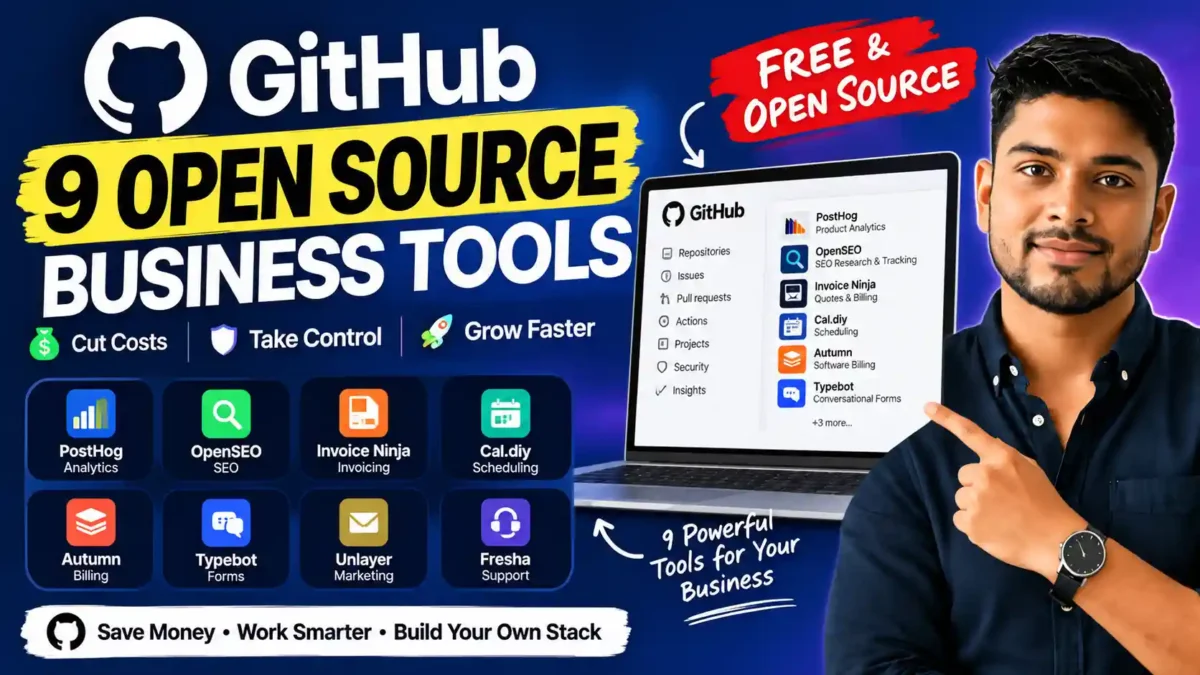

Explore nine open-source business tools for analytics, SEO, billing, scheduling, CRM, marketing, and support, and learn how they may help you save or earn more.
Software subscriptions add up fast. Analytics, invoicing, scheduling, CRM, email marketing, and support tools can each cost a monthly fee per seat, and those fees grow as your team does.
Open-source software offers another route. Many open-source projects let you host the tool yourself, adapt it to your workflow, and keep more control over your data. Some also offer paid hosted plans if you don’t want to manage servers.
This guide covers nine GitHub projects for analytics, SEO, invoicing, scheduling, billing, forms, customer management, marketing, and support. It draws on a video by Andrew Warner, and it also explains how business owners and consultants might use each tool to cut costs or build a new service.
Open Source Does Not Always Mean Free
Before the list, a reality check. The software itself may cost nothing, but running it usually does:
- Hosting: you may need a server or cloud account.
- Setup: installation and configuration take time or technical help.
- Updates and security: someone has to apply patches and keep data safe.
- Support: you may rely on community help instead of a support team.
If you are comfortable managing those details, or you can hire someone who is, these tools are a strong starting point. Always check each project’s current license, features, and requirements before committing.
See 9 Open-Source Business Tools
READ MORE
1. PostHog: Product Analytics
PostHog helps you understand how people use a website or product. It includes funnels, retention reports, session replays, and experiments. Together, these show where visitors drop off before signing up or buying.
How you might use it: watch a session replay, spot where a visitor gets confused, then test a clearer page design. A consultant could offer to set up analytics and help a client improve their customer journey.
Watch out for: analytics tools can collect sensitive user data. Review privacy rules, consent requirements, and data settings before installing any tracking software.
2. OpenSEO: SEO Research and Tracking
OpenSEO is presented as an open-source option for keyword research and rank tracking. The video also describes connecting it to an AI assistant or a company’s CRM, and building custom dashboards around the data a business actually needs.
READ MORE
How you might use it: keep research and rank tracking in one place, or use it as the base for offering SEO services to clients.
Watch out for: no tool guarantees better rankings. Good SEO still depends on sound research, genuinely helpful content, and regular review.
3. Invoice Ninja: Quotes and Billing
Invoice Ninja supports quotes, invoices, payments, subscriptions, and recurring billing. The video points out that automatic reminders can reduce the time you spend chasing overdue payments, and that recurring billing can turn ongoing services into monthly plans.
How you might use it: a freelancer can manage client payments in one system, and a consultant could help local businesses set up a clearer billing process.
Watch out for: compare payment processing fees and confirm which payment methods work in your region before switching.
4. Cal.diy: Scheduling
Cal.diy is a self-hostable booking tool. According to the video, it can connect calendars, add video meeting links, and charge for bookings. A paid first consultation or a refundable deposit can filter out casual bookings and protect your time.
READ MORE
How you might use it: creators and consultants can turn audience interest into paid sessions. You can also ask potential clients what they need before the call and use their answers to shape your offer.
5. Autumn: Software Billing
Autumn is designed for billing in software products. The video describes subscriptions, free trials, usage limits, and usage-based pricing, such as charging per request or per token.
How you might use it: developers building products with variable operating costs, such as AI apps, can match prices to actual usage.
Watch out for: usage-based pricing can be harder for customers to understand. Test it with real users and explain the terms clearly before launch.
6. Typebot: Conversational Forms
Typebot lets you build chat-style forms with branching flows. Instead of asking every visitor the same questions, it can show different questions based on earlier answers. The video also notes options for connecting forms to other services and using them on channels such as WhatsApp.
READ MORE
How you might use it: build a product finder that asks a few questions and guides visitors to the right product or page. Consultants can use thoughtful questions to help clients learn more about their potential customers.
Watch out for: keep forms short and be clear about how you will use the answers.
7. Frappe CRM: Leads and Deals
Frappe CRM is a customizable tool for tracking leads and sales opportunities. The video mentions deal stages, notes, tasks, custom fields, and connections to communication tools.
How you might use it: a small team can keep customer conversations and follow-up tasks organized in one place. A consultant might help a business design its sales pipeline and maintain the system.
Watch out for: someone still has to configure it, train users, and keep it running.
8. Mautic: Marketing Automation
Mautic is a self-hosted marketing platform with email campaigns, landing pages, forms, and lead scoring. The video suggests using it to build follow-up sequences for people who join a mailing list.
READ MORE
How you might use it: send relevant messages to subscribers based on their interests instead of treating everyone the same.
Watch out for: follow email and privacy laws, and always give people a clear way to unsubscribe. Campaigns should offer real value, not just more messages.
9. Chatwoot: Customer Support
Chatwoot brings customer conversations into one shared support inbox. The video describes pairing it with automation or AI to answer common questions and pass harder issues to a person.
How you might use it: a shared inbox helps a team avoid missed messages and involve the right person quickly.
Watch out for: before adding AI, decide which questions it can safely answer and make sure customers can always reach a human. Review data handling and access controls during setup.
How to Choose the Right Tool
You do not need to replace every paid app at once. A safer approach:
READ MORE
- Pick one problem. Missed invoices, unclear website behavior, scattered support messages, or costly software seats are good starting points.
- Compare honestly. Weigh the open-source option against your current tool, including hosting and maintenance costs.
- Test small. Try it with a limited group or a low-risk process before moving important business data.
- Measure the result. Track whether the change saves time, improves service, or brings in revenue.
Can You Earn Money From These Tools?
The video also frames these projects as opportunities for consultants. Many small businesses don’t have the time or technical skill to set up analytics, billing, or a CRM. Setup, training, and ongoing support can become a paid service. The same logic applies to your own business: the gain comes from improving a process, not simply from getting software for free.
Frequently Asked Questions
Is open-source software really free?
The software license may be free, but hosting, setup, updates, security, and support can cost time or money.
READ MORE
Is self-hosting safe?
It can be, but you become responsible for updates, backups, and access controls. If you aren’t comfortable with that, use a hosted plan or hire help.
Do I need technical skills?
Some tools are easy to install, while others require server knowledge. Check each project’s documentation before choosing.
Should I replace all my paid tools?
No. Start with one process, test it, and expand only if the results justify the effort.
Final Thoughts
Open-source tools can reduce software costs, give you more control, and open the door to new services. The best results come from a clear goal and careful testing. Choose one process that is costing you time or money, test one tool against it, and measure what changes.
For more practical guides, see how to make money with ChatGPT and Best AI Tools for Beginners.

Leave a Reply