
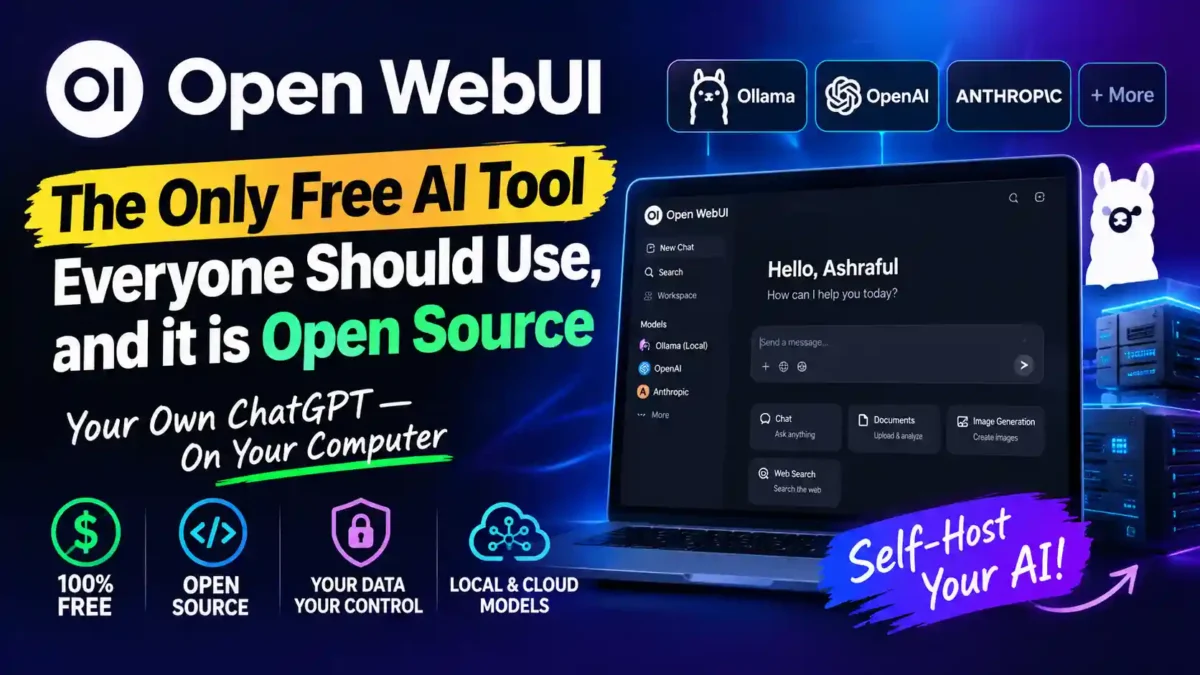

If you’ve been paying for a monthly AI subscription while your prompts and replies sit on someone else’s servers, this is the tool that changes that math. Open WebUI is a self-hosted chat interface that turns any computer with enough RAM into your own private ChatGPT. It connects to local models through Ollama or to cloud APIs like OpenAI and Anthropic, and it puts you in control of where your data actually lives.
Open WebUI, the self-hosted AI platform built by developer Timothy Jaeryang Baek, started life as a simple front end for Ollama and has grown into something much bigger. According to its GitHub repository, the project has passed 151,000 stars and over 22,000 forks, numbers that put it well ahead of most other self-hosted AI interfaces in terms of community adoption. That kind of traction matters because a self-hosted tool is only as good as the people fixing bugs and shipping updates behind it.
What makes it worth a closer look isn’t just that it’s free. Plenty of AI tools are free until you hit a usage cap. Open WebUI runs entirely on hardware you own, which means no per-seat pricing, no rate limits imposed by a vendor, and no surprise price hike six months from now. But it also comes with real responsibilities, and this guide covers both the upside and the trade-offs honestly.
What Is Open WebUI and How Does It Work?
Open WebUI is an open source, self-hosted web application that gives you a ChatGPT-style interface for talking to AI models, whether those models run on your own machine or through an API key from a provider like OpenAI or Google. You install it with Docker, pip, or Kubernetes, point it at Ollama or an OpenAI-compatible endpoint, and you have a private chat interface running on your own infrastructure within minutes.
To understand why this matters, it helps to know what “self-hosted” actually means. Instead of opening a website like chat.openai.com and typing into a box controlled by another company, you run the entire application on your own computer or server. The interface, the chat history, the settings, and the documents you upload all live on hardware you control. When you use a local model through Ollama, even the AI processing happens on your machine, which means nothing leaves your computer at all.
The setup itself is refreshingly simple for something this capable. A single Docker command, such as the one in the project’s own documentation, pulls the image and mounts a persistent volume so your chats and settings survive restarts. If you already run Ollama locally, Open WebUI just needs to be pointed at it, and you’re chatting with a local model in your browser a few minutes later.
Who is this for? Open WebUI is a strong fit for solo users who care about privacy, small teams that want to share an AI workspace without paying per seat, developers who need to test multiple models, and anyone who wants to avoid vendor lock-in. It is less suitable for people who want a zero-maintenance experience or who are uncomfortable using a terminal.
Key Features That Set It Apart
Open WebUI isn’t just a chat box. It ships with retrieval-augmented generation (RAG) backed by nine supported vector databases, including ChromaDB, Qdrant, Milvus, and Pinecone, according to the project’s GitHub README. That means you can drag a PDF or a folder of documents into a conversation and the model will actually reference them, using hybrid search that combines keyword-based BM25 with vector search and reranking for more accurate answers.
READ MORE
In plain terms, RAG lets you chat with your own documents. Instead of the model relying only on its training data, it looks up relevant passages from the files you provide and uses those to answer. This is especially useful for research, legal documents, technical manuals, or any situation where you need the AI to cite specific sources you trust.
It also supports granular role-based access control, so an admin can set up separate permission groups for different users, which is genuinely useful if you’re deploying this for a small team rather than just yourself.
Beyond chat, the platform now includes Notes for drafting outside of conversations, Channels for shared team spaces where models participate alongside people, and built-in calendar and automation features that let a model manage scheduled prompts.
On the model side, Open WebUI isn’t locked into any single provider. You can mix local Ollama models with LMStudio, GroqCloud, Mistral, OpenRouter, and vLLM, switching between them inside the same conversation. For image generation, it plugs into OpenAI’s DALL-E, Google’s Gemini, and local tools like ComfyUI and AUTOMATIC1111, so you’re not stuck choosing one lane and living with it.
How Often Does Open WebUI Get Updated?
Fairly often, based on its recent release history. Version 0.11.1 shipped on August 25, 2026, adding tool-call approvals, a feature that lets a model pause mid-task and ask you a clarifying question, plus a terminal file browser and faster delta streaming for replies. That followed version 0.11.0 on July 27, 2026, which reorganized the entire settings interface and sidebar. For a self-hosted tool, that pace of shipping is a genuine point in its favor, since abandoned self-hosted software is a real risk you take on when you choose it over a cloud service.
| Feature | What it does | Why it matters |
|---|---|---|
| RAG with 9 vector databases | Chat with your own PDFs, documents, and websites | Accurate, source-backed answers instead of generic model knowledge |
| Role-based access control | Create permission groups for different users | Safe for small teams and shared deployments |
| Multi-model conversations | Run the same prompt against multiple models | Compare outputs before committing to one model |
| Channels and Notes | Shared team spaces and drafting area | Collaboration without leaving the interface |
| Broad model support | Ollama, LMStudio, GroqCloud, Mistral, OpenRouter, vLLM | No vendor lock-in; switch models freely |
| Image generation integrations | DALL-E, Gemini, ComfyUI, AUTOMATIC1111 | One interface for text and images |
Real-World Performance: Is It Actually Worth Self-Hosting?
The honest answer depends on what hardware you’re running it on. If you’re pairing Open WebUI with a capable local model through Ollama, response quality and speed come down almost entirely to your GPU, not the interface itself. The interface layer is snappy in day-to-day use, and features like multi-model conversations, where you can run the same prompt against two or three models at once, are genuinely handy for comparing outputs before you commit to one.
Where it gets more demanding is on the operations side. You’re now responsible for the Docker container, the database, and any updates, which is a very different experience from opening a browser tab and typing into ChatGPT. Some users on forums like Reddit’s self-hosting communities have noted that what started as a simple chat frontend has grown into something closer to a full platform, which means more moving parts to keep patched and running.
Real-world scenario: Small business document search. A law firm has hundreds of PDF contracts and wants to ask questions like “What is the termination clause in the Johnson agreement?” They install Open WebUI on a local server, connect it to a local model via Ollama, upload their contract folder, and now any staff member can query the documents without sending confidential client data to a third-party cloud. The setup takes an afternoon. The privacy benefit is permanent.
Real-world scenario: Developer using local models for code. A freelance developer wants to use AI for code suggestions but doesn’t want to send proprietary code to OpenAI. He runs a local coding model through Ollama, connects it to Open WebUI, and uses the interface to generate boilerplate, explain errors, and refactor functions. The model is less powerful than GPT-5, but the code never leaves his machine.
Real-world scenario: Privacy-conscious individual. A journalist needs to summarize sensitive interview transcripts. She uses Open WebUI with a local model, uploads the transcripts, and asks for summaries. Nothing is sent over the internet. The trade-off is that local models are slower and sometimes less accurate than top cloud models, but for sensitive material, that is often an acceptable trade.
What Should You Know About the Licensing Before You Commit?
This is the part that catches people off guard, and it’s worth stating plainly. Open WebUI switched away from a fully permissive BSD-3-Clause license back in 2025, introducing what the project calls a branding protection clause. In practice, that means deployments with more than 50 aggregate users need to keep the “Open WebUI” branding visible unless they qualify for an exception or buy an enterprise license, according to the project’s own licensing documentation.
The change didn’t go unnoticed. A Hacker News discussion on the license shift argued that the new terms functioned like an old-school BSD advertising clause and raised concerns that a mandatory branding requirement could eventually become what one commenter called a trademark landmine for anyone building on top of the project.
For a solo user or small team under the 50-user threshold, none of this changes anything in practice. But if you’re planning to deploy Open WebUI at real scale inside a company, it’s a detail worth reading before you build a dependency on it. The project is still free and source-available, but it is not the fully permissive MIT or BSD license some people assume when they hear “open source.”
Open WebUI vs LibreChat: Which Should You Choose?
LibreChat is the most natural point of comparison, since it’s also free, open source, and self-hosted, and it solves a similar problem from a slightly different angle. Where Open WebUI leans hard into local model management and built-in document retrieval, LibreChat prioritizes juggling multiple cloud providers, supporting more than 15 of them including OpenAI, Anthropic, and Google Gemini in a single interface, with the ability to switch models mid-conversation.
READ MORE
| Factor | Open WebUI | LibreChat |
|---|---|---|
| Best for | Local models via Ollama, document-heavy RAG use | Juggling many cloud AI providers in one place |
| License | Open WebUI License with branding clause (50+ users) | MIT license, fully permissive |
| Admin controls | Detailed RBAC and browser-based admin panel | Lighter, more config-file driven |
| Setup complexity | Docker or pip, moderate | Docker or npm, moderate to higher for advanced features |
| Community size | 151,000+ GitHub stars | Smaller but active community |
| Plugin ecosystem | Growing, with built-in tools and functions | Strong plugin support for cloud providers |
| Document RAG | Built-in with 9 vector databases | Available via plugins, less integrated |
Neither tool is strictly better across the board, and that’s worth saying directly. If your priority is running everything against a local model with strong document search built in, Open WebUI’s admin panel and RAG pipeline make it the more polished choice. If you need to test the same prompt against Claude, GPT, and Gemini without switching apps, LibreChat’s provider flexibility is the stronger fit.
Pros and Cons
- Pro: No subscription cost beyond your own hardware or API usage, which can genuinely undercut a $20 to $25 per user ChatGPT Plus bill at team scale.
- Pro: Nine supported vector databases and hybrid RAG search make it strong for chatting with your own documents.
- Pro: Broad model support means you’re never locked into a single AI provider.
- Pro: Frequent updates, with two major releases in the last two months of research for this article alone.
- Pro: Active community with over 151,000 GitHub stars, which means bugs get fixed and questions get answered.
- Con: You take on real operational responsibility: Docker maintenance, backups, and updates all fall on you.
- Con: The 2025 license change adds a branding requirement for larger deployments, a real limitation for growing teams to plan around.
- Con: Some users report that the growing feature set has made what used to be a lightweight chat frontend noticeably heavier to run.
- Con: Local models require a decent GPU to run well, which can be a significant upfront cost.
A Step-by-Step Guide to Setting Up Open WebUI
If you’re new to self-hosting, this is the simplest path to a working setup.
READ MORE
What You Need Before You Start
- A computer running Windows, macOS, or Linux. A server or a spare laptop works well.
- Docker installed. If you don’t have it, download Docker Desktop from docker.com.
- At least 8GB of RAM for the interface. If you want to run local models, 16GB or more is better, and a dedicated GPU with 8GB+ VRAM is ideal.
- Basic comfort with a terminal or command prompt. You only need to copy and paste a few commands.
Step 1: Install Ollama (Optional, for Local Models)
If you want to run models on your own machine, install Ollama from ollama.com. Once installed, open a terminal and run a model, for example: ollama run llama3. This downloads the model and starts a local server. If you only plan to use cloud APIs, you can skip this step.
Step 2: Run Open WebUI with Docker
Open a terminal and run the following command. This pulls the Open WebUI image and starts it:
docker run -d -p 3000:8080 --add-host=host.docker.internal:host-gateway -v open-webui:/app/backend/data --name open-webui --restart always ghcr.io/open-webui/open-webui:mainThis command maps port 3000 on your computer to the container, mounts a volume so your data persists, and sets the container to restart automatically. If you’re on Linux, you may need to adjust the host mapping.
Step 3: Open the Interface
Open your browser and go to http://localhost:3000. You’ll see a login screen. The first account you create becomes the admin. Create your account and log in.
Step 4: Connect a Model
If you installed Ollama, Open WebUI should detect it automatically. If not, go to Settings > Connections and add your API key for OpenAI, Anthropic, or another provider. You can also add a custom OpenAI-compatible endpoint.
Step 5: Upload a Document and Test RAG
Start a new chat, click the attachment icon, and upload a PDF. Ask a question about the document. The model will use RAG to find relevant passages and answer based on them. This is the feature that makes Open WebUI more than just a chat interface.
Step 6: Set Up Users and Permissions (Optional)
If you’re using this with a team, go to Admin Settings > Users and create additional accounts. You can assign roles and permissions to control who can access which models and features.
Common Troubleshooting Tips
- If the page doesn’t load, check that Docker is running and the container is active with
docker ps. - If models don’t appear, verify that Ollama is running and accessible.
- If performance is slow, try a smaller model or check your GPU usage.
- If you lose your data after a restart, make sure you mounted the volume correctly.
Cost Analysis: Is It Really Cheaper Than ChatGPT Plus?
The answer depends on how you value your time and what hardware you already own.
| Cost factor | Open WebUI (local) | Open WebUI (cloud APIs) | ChatGPT Plus |
|---|---|---|---|
| Monthly subscription | $0 | $0 (interface) | $20 per user |
| API usage | $0 | Pay per token, varies | Included |
| Hardware | One-time cost, $500–$2,000+ for a capable GPU | Minimal, any computer works | None |
| Electricity | Higher if running GPU | Low | None |
| Maintenance time | You manage updates, backups | You manage updates, backups | None |
For a solo user who already owns a capable computer, Open WebUI with local models can be effectively free after the initial setup. If you use cloud APIs, you pay only for what you use, which may be cheaper than a $20 monthly subscription if your usage is light. For a team of five, ChatGPT Plus would cost $100 per month. Open WebUI on a shared server could cost less than that after the first few months, depending on hardware and API usage.
The trade-off is time. You will spend a few hours setting it up and occasional time maintaining it. If your time is worth $50 per hour, and you spend two hours a month on maintenance, that is $100 in opportunity cost. For some people, the privacy and control are worth it. For others, paying for convenience makes more sense.
Common Mistakes When Self-Hosting Open WebUI
READ MORE
- Exposing the instance to the internet without authentication. If you open a port to the public web without setting up proper authentication, anyone can access your chats and documents. Keep it on your local network or use a secure reverse proxy with authentication.
- Forgetting to back up. The Docker volume contains your chats, settings, and uploaded documents. If you delete the container without backing up the volume, you lose everything. Set up regular backups.
- Using underpowered hardware for large models. A 70-billion-parameter model will not run well on a laptop with 8GB of RAM. Match the model size to your hardware.
- Ignoring updates. Open WebUI ships updates frequently, including security fixes. Check for updates every few weeks and apply them.
- Misunderstanding the license. If you plan to deploy for more than 50 users, read the license terms before you build your workflow around it.
- Not testing with real documents. RAG works best when you test it with the types of documents you actually use. Try a few before relying on it for critical work.
Frequently Asked Questions
Is Open WebUI really free to use?
Yes, for individuals and teams of 50 or fewer users, Open WebUI is free to self-host with no subscription fee, though you still pay for your own server or GPU hardware and any cloud API calls you make through it.
Do I need a powerful computer to run Open WebUI?
Not necessarily. You can run it with cloud API keys like OpenAI’s on very modest hardware, but running local models well through Ollama benefits significantly from a dedicated GPU with enough VRAM for the model size you choose.
Can Open WebUI replace ChatGPT Plus for a small team?
For many teams, yes. It connects to the same underlying models through API keys and adds document search and multi-user management, which can undercut a per-seat ChatGPT Plus subscription once you factor in server costs.
Is Open WebUI safe for handling private documents?
It can be, since everything runs on infrastructure you control and data isn’t sent anywhere unless you connect an external model provider. If privacy is the main driver, pairing it with fully local models through Ollama keeps everything off the internet entirely, similar in spirit to the privacy tradeoffs discussed in what a VPN actually protects you from.
What’s the catch with the “open source” label?
The catch is the 2025 licensing update, which added a branding requirement for larger deployments. It’s still free and source-available, but it isn’t the fully permissive MIT or BSD license some assume when they hear “open source,” a distinction covered in more detail in Open WebUI’s GitHub repository and discussed critically in a Hacker News thread on the change.
Can I access Open WebUI from my phone?
Yes, if you host it on a server that is accessible on your network or through a secure tunnel, you can access the web interface from any device with a browser, including phones and tablets. The interface is responsive and works well on mobile screens.
How do I back up my Open WebUI data?
The data is stored in a Docker volume. You can back it up by stopping the container and copying the volume directory, or by using a tool like docker cp to copy the data out. It’s also a good idea to export important chats manually.
Does Open WebUI support multiple users at once?
Yes. It has role-based access control and supports multiple user accounts. Each user can have their own chats and settings, and admins can manage permissions.
If you’re building out a wider free AI toolkit rather than just one chat interface, it’s worth pairing this with a broader list like our roundup of best free AI tools for content creators in 2026, and if you want Open WebUI’s automation features to eventually earn their keep, our guide on how to earn money from an AI agent is a natural next read.
Final Verdict
If you want a private, capable, actively maintained AI interface and you’re comfortable running a Docker container, Open WebUI is the strongest free option available right now, and that’s true whether you’re a solo tinkerer or a small team. Start with the Ollama-bundled install if you’re new to self-hosting, since it gets you a working local model and interface in one command. Just budget time for basic maintenance, and if you’re scaling past 50 users, read the license page before you get attached to the workflow you build.
The bottom line: Open WebUI is not a magic free lunch, but it is a genuinely powerful tool that gives you control over your AI workflow in a way that cloud subscriptions cannot. If privacy, cost control, and flexibility matter to you, it is worth the effort.


Leave a Reply